






Book a demo
Loading contact form…

Bills & Payables
Accounts payable, connected to the books.
Bills & Payables brings bill entry, approvals, and payments into one workspace within the Archway Platform, with every bill and payment posted to the same general ledger as your accounting. Now with Smart AP Capture, which reads PDF bills for your team to review.
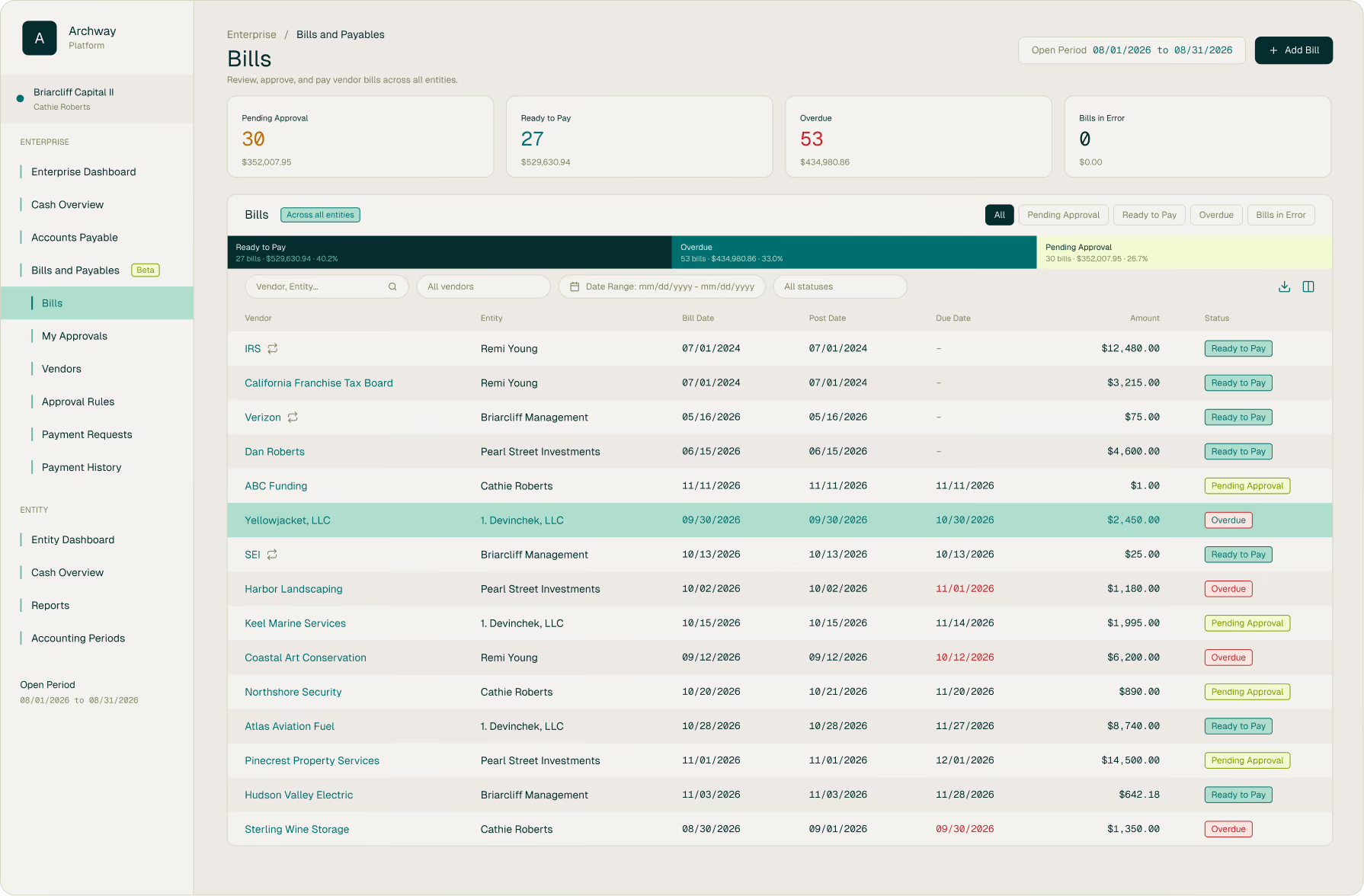
What changes
With Bills & Payables, your team can
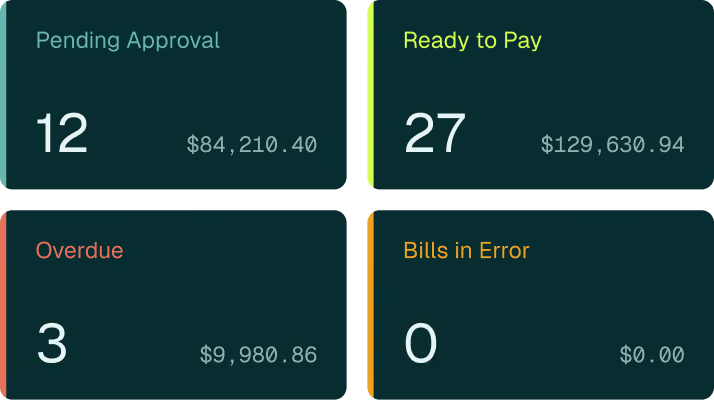
See every bill in one place.
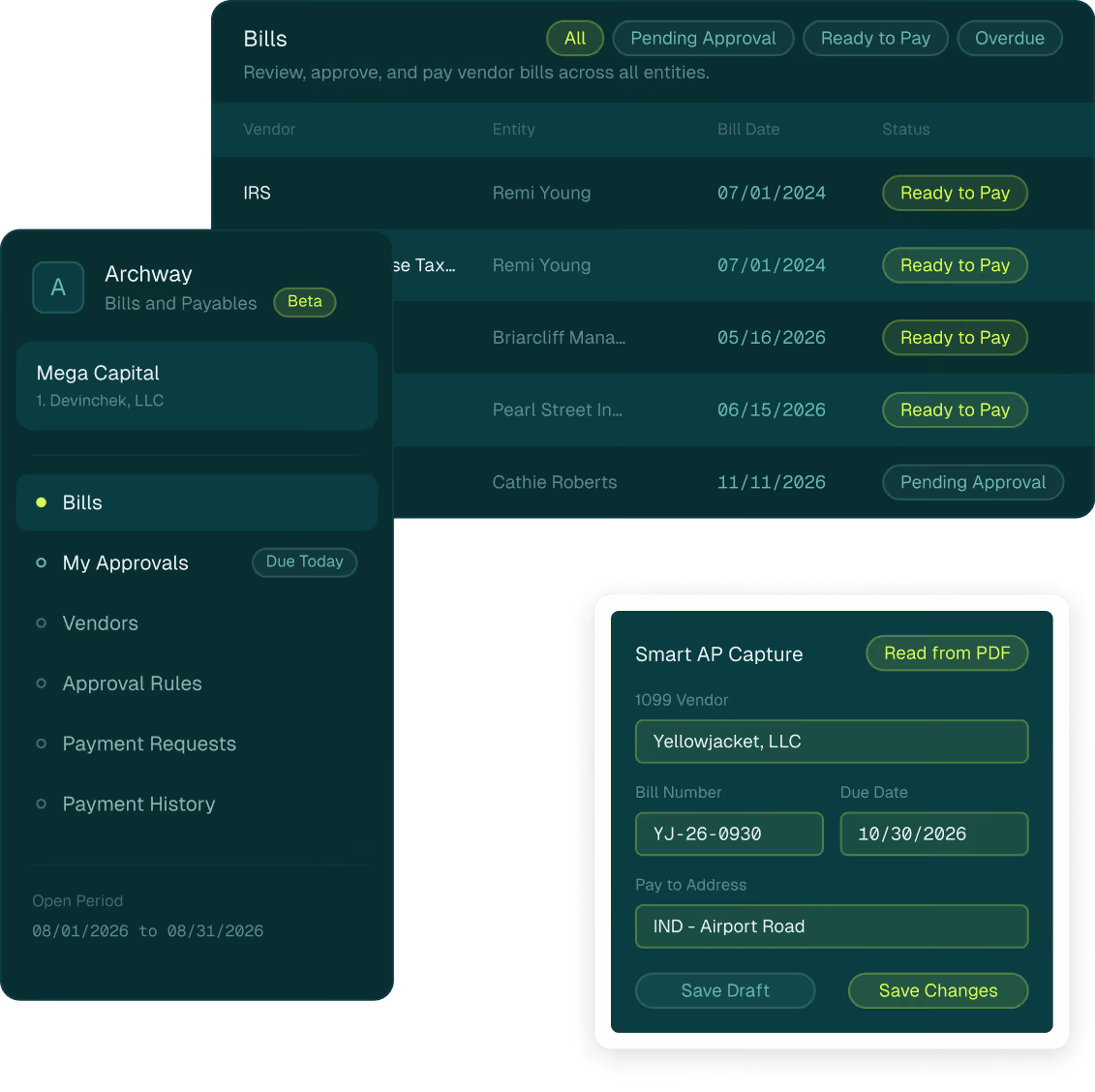
Track bills across every entity you manage in a single list, with clear statuses for what is pending approval, ready to pay, overdue, or in need of attention.
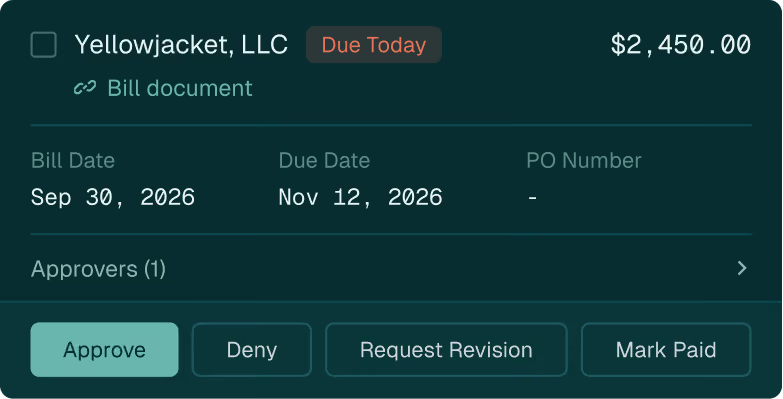
Approve with a clear record.
Route bills and payments through rules that reflect how your office works, with every approval, denial, and note recorded with who took it and when.
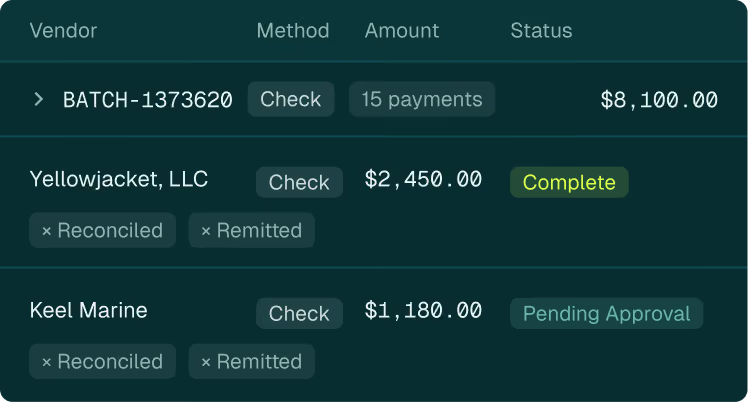
Keep payables on the books.
Post every bill and payment to the same general ledger as your accounting and reporting, with no separate bill pay tool to keep in sync.
The problem we've heard
Bills arrive as PDFs in different inboxes.
Bills arrive as PDFs in different inboxes. Approvals move through email and follow-up calls, often while principals are traveling. Payments are prepared in one place while the accounting is recorded in another, so every handoff adds retyping and questions about who approved what.
What we built
Bills & Payables brings that work into one workspace inside the Archway Platform. Bills are captured once, routed through approval rules that reflect how your office works, and paid from the same record that feeds your general ledger. Much of what it does today came directly from client feedback.

product walkthrough
See Bills & Payables in action
Watch how a bill moves from upload through review, approval, and payment.


Smart AP Capture
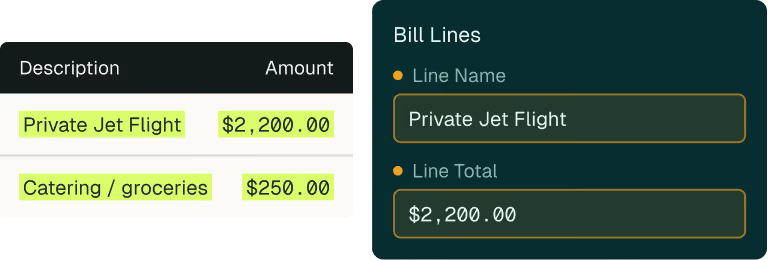
Upload a PDF bill and review the details Archway fills in, such as the vendor, bill number, dates, amounts, and bill lines, beside the original. A person always reviews and saves each bill. Available only in Bills & Payables.

Approval rules
Build bill and payment rules in one place using entity, vendor, amount, bank account, and payment method.

My Approvals
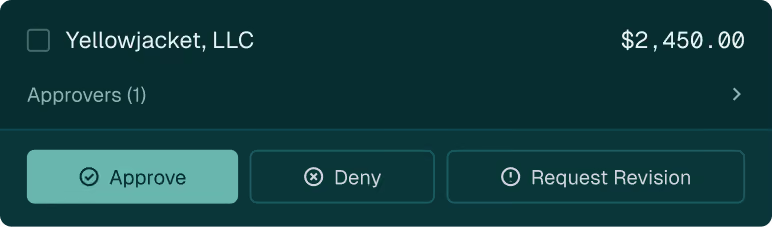
Approvers see their queue with the bill attached, and substitutes can cover planned absences.

Payment history
See each payment's status, the bills it paid, its accounting entries, and its payment file.

How it works

01 / 03
Capture
Upload a PDF for Smart AP Capture, enter a bill by hand, or import bills in bulk.

02 / 03
Approve
Rules route bills and payments to the right approvers, and every action is recorded.


03 / 03
Pay
Build payment requests by bank account and payment method, and payments post to the general ledger.
Who it's for
Family offices and wealth organizations managing bills across many entities, from the AP teams who enter them to the controllers, CFOs, and principals who approve them.
Start the conversation
See how Bills & Payables fits your operation.
Whether you are evaluating Archway or already work with us, we can walk you through how Bills & Payables would support your entities, approvers, and payment process.
Loading contact form…

FAQ's
The questions we hear most. Answered directly.
Does our team need to migrate data?
Bills, vendors, and payments carry over, but approval rules don’t. Rules need to be set up again in Bills & Payables. For existing Archway clients, Bills & Payables uses the same data as the legacy AP module, so existing bills, vendors, and payments appear automatically. Approval rules are set up in Bills & Payables, and your relationship manager can help.
Does someone still review each bill?
Yes. Smart AP Capture fills in the details, and a person always reviews and saves the bill.
Which payment methods are supported?
ACH, check, and wire, using the payment types already set up for your organization. Bills & Payables produces the payment files, and each file is kept in the payment’s history.

Article
·
Single Family Offices
time
-min
read
The Hidden Costs of Spreadsheet-Driven Family Office Operations
Most family offices do not wake up one morning and decide to build a spreadsheet-driven operating model.
It happens gradually.
A spreadsheet created to solve one reporting challenge becomes two, then ten. Over time, critical financial information becomes dispersed across workbooks, shared drives, email attachments, and manual processes. What began as a practical solution transformed into operational dependency.
For many organizations, that dependency develops quietly. Reporting continues to be delivered. Financial statements are produced. Capital activity is tracked. Ownership schedules are maintained. The process may not appear broken, but the effort required to sustain it increases with every new entity, investment, account, and stakeholder added to the environment.
The issue is not Excel itself. Spreadsheets remain one of the most valuable tools available to finance professionals. The challenge emerges when spreadsheets evolve from analytical tools into systems of record that support critical family office accounting, reporting, and operational processes.
As family offices grow more complex, the hidden costs of spreadsheet-driven operations become increasingly difficult to ignore.
Why Spreadsheet Dependency Persists
For many family offices, spreadsheets offer speed, flexibility, and familiarity—enabling quick reporting and custom analysis without relying on technology resources. That flexibility is valuable, but it also drives deep reliance on spreadsheets in daily operations.
Over time, they become the default solution for increasingly complex needs: investment data in one workbook, ownership in another, capital accounts elsewhere, and reporting assembled manually. Individually manageable, these processes collectively create an operating environment that is difficult to scale, govern, and sustain.
Where the Real Effort Is Hidden
When finance and operations teams evaluate their reporting processes, they typically focus on whether reports are ultimately delivered accurately and on time. While those outcomes matter, they do not always reveal the amount of effort required to achieve them.
Many family offices spend significant time collecting information from custodians, investment managers, banks, accounting systems, fund administrators, and third-party providers before reporting can even begin. Data must be validated, reconciled, reformatted, consolidated, and reviewed. Adjustments are made manually, and supporting schedules are frequently maintained outside core systems.
This work is often treated as a normal part of the reporting cycle because it has existed for years. But the true cost is the cumulative burden created by hundreds of manual activities across every close, every reporting cycle, every capital activity update, and every year-end process.
When Complexity Outgrows the Spreadsheet
Family office environments present operational challenges that differ significantly from those of mature businesses with enterprise-scale finance organizations.
Many organizations manage multiple legal entities, trusts, partnerships, foundations, operating companies, investment vehicles, and family ownership structures simultaneously. Reporting requires information to be consolidated across operating entities, investment entities, trusts, partnerships, and beneficiaries. Capital account reporting, partnership allocations, intercompany activity, trust distributions, and investment reporting all introduce layers of complexity that are difficult to manage when information resides across disconnected spreadsheets.
As complexity grows, spreadsheets become increasingly difficult to maintain. A change to an ownership structure may require updates across multiple workbooks. A new investment may introduce additional reporting requirements. Partnership allocations must be calculated, validated, and reflected consistently across capital accounts. Intercompany transactions must be reconciled. Custodian data must be normalized before it can be used in consolidated reporting for family offices.
Even straightforward reporting requests will require substantial manual effort when accounting data, investment data, ownership records, and supporting schedules are maintained across different files and systems.
Several warning signs often emerge.
- Reporting Cycles Become Longer
Finance teams spend more time gathering and validating information before analysis and reporting can begin. Month-end, quarter-end, and year-end processes become increasingly dependent on manual coordination, especially when reporting packages require data from multiple custodians, investment managers, entities, and accounting schedules.
- Reconciliations Become More Difficult
Multiple versions of the same information begin to exist across different files and teams. Custodian data may not match accounting records. Investment manager statements may need to be reconciled against internal books. LP capital account balances may require manual validation before year-end reporting or K-1 production can move forward.
- Knowledge Becomes Concentrated
Critical reporting processes become dependent on a small number of individuals who understand how spreadsheets were built, linked, and maintained. If a controller, accountant, or operations lead leaves, the family office may lose the institutional knowledge behind how key reporting, allocation, and reconciliation processes actually work.
- Visibility Declines
As information becomes fragmented across systems and files, it becomes more difficult to obtain a complete view of financial activity across the organization. Leadership may struggle to quickly understand liquidity positions, entity-level exposures, ownership relationships, and overall portfolio performance without waiting for manual consolidation.
- Growth Creates Additional Strain
What worked effectively for ten entities may not work for fifty. What worked for a handful of investments may not work for hundreds. As entities, accounts, partnerships, and reporting stakeholders increase, the effort required to sustain spreadsheet-driven processes often grows faster than the team supporting them.
These challenges create operational and investment risk. They also affect confidence.
Why This Matters More Than Ever
Family offices have the volume, complexity, and pace of information more akin to large and mature business yet maintain lean staffing more like a small business.
Many entities have significant or complex accounting and accounts payable needs. Investment portfolios are more diversified. Reporting expectations continue to rise. Stakeholders expect faster access to information and greater transparency across assets, entities, and ownership structures. At the same time, many family offices are being asked to do more with lean teams and finite resources.
Many organizations are also exploring automation, advanced reporting capabilities, and artificial intelligence to improve efficiency and decision-making. These initiatives have real potential, but they depend on one common prerequisite: reliable data.
Organizations cannot automate inconsistent processes. They cannot generate meaningful insights from fragmented information. They cannot fully benefit from AI if the underlying data lack’s structure, consistency, and governance.
Technology can accelerate existing processes, but it cannot compensate for poor data quality.
Excel Still Has an Important Role
None of this suggests that family offices should eliminate spreadsheets.
Excel remains one of the most effective tools available for financial analysis, forecasting, budgeting, modeling, and scenario planning. It provides flexibility that many systems cannot replicate.
The objective is not to remove spreadsheets from the finance function. The objective is to ensure that spreadsheets support analysis rather than serve as the primary repository for critical operational and financial information.
Organizations that establish this distinction are often better positioned to improve family office reporting, strengthen controls, reduce operational risk, and support future growth.
How Archway Can Help
Archway helps family offices bring accounting, investment data, and reporting together within a single platform.
With support for multi-entity accounting, complex ownership structures, capital account accounting, consolidated reporting, and family office-specific workflows, Archway helps reduce manual effort while improving visibility, consistency, auditability, and control.
That matters in the areas where spreadsheet dependency creates the most strain: ownership allocations, entity-level reporting, intercompany reconciliation, capital account tracking, and the ability to trace numbers back to the source.
For organizations seeking additional support, Archway’s Family Office Accounting services can help with bookkeeping, accounting, investment reporting, and related operational workflows.
The result is a stronger foundation for reporting, governance, scalability, and long-term growth.
Looking Ahead
Spreadsheet dependency is often a symptom of growth. As family offices become more sophisticated, the operating practices that once supported the organization may become increasingly difficult to sustain.
The next step is not simply replacing spreadsheets. It is creating a stronger foundation for financial data, reporting, governance, and decision-making.
In the next article, we explore what that foundation looks like and why it has become increasingly important as family offices prepare for a future shaped by automation, advanced reporting, and artificial intelligence.

Article
·
Single Family Offices
time
-min
read
Data Alone Isn’t Enough: The Next Stage of AI Readiness
Earlier in this series, we discussed why “having good data” is one of the most important first steps in any artificial intelligence strategy. Clean, accurate, and organized information creates the foundation AI systems rely on to generate meaningful insights and support better decision-making.
However, data quality is only one piece of the equation. For Family Offices and wealth management organizations, AI success also depends on the infrastructure, governance, integrations, and operational processes surrounding that data. Even strong datasets can create challenges when information is fragmented across systems, managed inconsistently, or difficult to access in real time.
The next stage of AI readiness is about creating an environment where data can move efficiently, securely, and intelligently across the organization. In this article, we’ll explore what that looks like in practice and why operational readiness is becoming just as important as data quality itself.
Phase 1: Data Governance and Stewardship
Effective data management requires clear governance structures that define roles, responsibilities, and decision-making authority. Who owns the data? Who is responsible for data quality and integrity? Who approves sensitive data access requests? Who sets data retention policies? Clear answers to these questions are essential.
In family offices, governance is further complicated by the involvement of multiple stakeholders: family members, investment staff, external advisors, and service providers, each of whom may have different views on data priorities, privacy requirements, and acceptable uses. Establishing and maintaining consensus requires active governance mechanisms.
For AI specifically, governance policies must address additional questions: What data can be used for model training? How should models be validated before deployment? What level of human oversight is required for AI-generated recommendations? How are model decisions documented and explained? Who can deploy new AI capabilities?
Governance must also extend to third-party service providers. How are they using your data? What safeguards are they maintaining, particularly for the most sensitive information?
Phase 2: Foundation Building
Before deploying sophisticated AI capabilities, family offices must establish solid data foundations. This phase focuses on four priorities:
- Comprehensive data inventory. Catalog all data sources, document their contents and update frequencies, identify gaps and quality issues, and map data flows between systems. This baseline understanding clarifies what data resources exist and where improvement is needed.
- Data consolidation. Deploy a data lake or similar solution to create a unified view of family office assets and eliminate siloed information.
- Data quality processes. Implement validation rules, exception reporting, and correction workflows. Define data ownership and accountability. Establish metrics for measuring quality and track improvements over time.
- Data catalogs. As data ecosystems grow in complexity, the ability to find and understand available data becomes critical. Data catalogs inventory available datasets, document their contents and lineage, and facilitate discovery. For AI implementations, they help data scientists identify relevant datasets, support model debugging, and facilitate impact analysis when data sources change. Maintaining comprehensive data catalogs, however, requires dedicated effort and appropriate tooling.
Phase 3: Targeted AI Pilots
With foundational data infrastructure in place, family offices can begin experimenting with AI through targeted pilot projects. Pilots serve multiple purposes: demonstrating value, building internal expertise, uncovering unforeseen challenges, and refining implementation approaches.
Successful pilots share common characteristics. They address well-defined problems with measurable outcomes, leverage data that is already relatively clean and accessible, have executive sponsorship and appropriate resources, and include mechanisms for capturing lessons learned.
Example pilot projects might include:
- Portfolio rebalancing optimization using machine learning to minimize tax impact
- Document processing automation for extracting data from fund statements or K-1 tax forms
- Anomaly detection for identifying unusual transactions or market movements
- Natural language processing for analyzing investment research reports or earnings call transcripts
Phase 4: Scaling and Integration
Successful pilots provide the foundation for broader AI adoption. The scaling phase focuses on expanding AI capabilities across additional use cases, integrating AI insights into decision-making workflows, and building organizational muscle memory for maintaining and improving AI systems.
This phase requires balancing expansion with sustainability. Adding new AI capabilities without corresponding investments in data infrastructure, governance, and talent can produce poor results. Successful scaling requires disciplined program management, continued focus on data quality, and ongoing capability development.
Best Practices and Recommendations
Start with Data, Not Algorithms
The allure of sophisticated AI models can tempt organizations to prematurely focus on algorithm selection and model development. Resist this temptation. No algorithm, however advanced, can compensate for poor-quality or inaccessible data. Invest first in data infrastructure, quality, and governance, including the unglamorous but essential work of data cleaning, standardization, and consolidation.
Embrace Incremental Progress
Transformative AI capabilities are built incrementally, not through sweeping all-at-once implementations. Start with focused projects that deliver tangible value quickly, use early wins to build momentum and secure resources, and iterate based on experience. This approach reduces risk, facilitates learning, and maintains stakeholder engagement.
Build Privacy and Security In
Security and privacy cannot be afterthoughts. Design data architectures with privacy preservation from the outset. Implement encryption, access controls, and audit logging while consistently evaluating outside vendors rigorously on their security practices.
Develop Governance and Internal Capabilities
Establish a clear governance structure and processes early. Invest in internal capabilities through hiring, training, and hands-on experience. Even small family offices can cultivate basic data literacy and AI fluency among existing staff; internal expertise enables more effective vendor management and supports long-term sustainability.
Measure and Monitor
Establish metrics for evaluating AI initiatives. Track data quality indicators, model performance, user adoption rates, and business impact. Regular monitoring surfaces issues early, supports continuous improvement, and demonstrates value to stakeholders. What gets measured gets managed, and that principle extends to third-party providers as well.
Build vs. Buy
Organizations must determine the right approach to their data management challenges. Building internal capabilities offers control and customization but requires significant investment. Purchasing packaged solutions from third-party providers can enable faster, more cost-effective deployment but may sacrifice flexibility. A hybrid approach, combining in-house capabilities with external service providers, potentially guided by consultants or advisors, is another viable path. The right choice depends on organizational size, available resources, and technology sophistication.
How Archway Can Help
The data challenges described in this post are precisely the problems the Archway Platform was designed to solve. For nearly 25 years, Archway has helped family offices and financial institutions aggregate, consolidate, standardize, and manage their key financial data and documents.
The Archway Platform addresses core data readiness challenges in several ways:
- Consolidated data in a single environment. The platform brings together accounting and investment data across custodians, asset classes, and currencies, eliminating the fragmented, multi-silo environments. With a single, reconciled source of financial truth, AI tools have the clean, comprehensive dataset they need to function effectively.
- Structured, auditable financial data. Archway's foundational general ledger automatically books journal entries as transactions are processed, producing well-labeled, consistently formatted data as a natural byproduct of normal operations, exactly what AI systems require.
- Alternative investment data ingestion. Through ingestion tools and partnerships with companies like Canoe Intelligence and Arch, the platform streamlines the extraction and processing of alternative investment data. Capital calls, distribution notices, K-1s, and fund statements are among the most persistent data gaps for family offices seeking AI-ready data, and they are handled more efficiently within the platform.
- Built for complexity and scale. The platform is designed for the unique demands of UHNW family offices, including multi-entity structures, multi-generational ownership, and multi-asset portfolios. As data needs grow, the platform scales with them.
For family offices looking to build the data foundation that makes AI possible, Archway provides both the technology and operational support to get there.
Artificial Intelligence will reshape wealth management, but the firms that benefit most will be those building to enable it. That means investing in the data infrastructure, governance, and processes outlined throughout this series, not just pursuing AI on its own.
The question is not whether AI will transform the industry. It will. The more important question is which organizations will be ready to harness it effectively.

Article
·
Single Family Offices
time
-min
read
In a recent post, we outlined five focus areas for starting an AI journey, with Get Educated as the essential first step. Given the enormous amount of buzz and hype surrounding AI, we wanted to point you toward sources that go beyond the headlines and offer substantive, fact-based information and perspectives.
Below is a curated list of educational resources for Family Offices looking to build their AI knowledge. We start with our top recommendations: MIT, Stanford, and Harvard, three institutions at the forefront of AI research and among the most authoritative sources for insights on artificial intelligence trends and developments. Leading AI platforms OpenAI and Claude also offer helpful educational content. For current news and developments, Forbes and Wired are solid starting points. We've also included online courses for those seeking deeper immersion, a selection of books offering both accessible and in-depth perspectives, and research from several leading consulting firms.
Top Recommendations
- MIT Technology Review – No hype; written by practitioners. technologyreview.com | MIT AI News
- Stanford AI Index Report – hai.stanford.edu/ai-index
- Stanford Digital Economy Lab – digitaleconomy.stanford.edu
- OpenAI – Leading AI platform; research, tools, and product updates (ChatGPT). openai.com
- Claude – Leading AI platform; research, tools, and product updates. claude.ai
- The Batch (DeepLearning.AI) – Explains what matters in AI. deeplearning.ai/thebatch
- Harvard Business Review – AI case studies. hbr.org
- Artificial Intelligence News – Trends and real-world applications. artificialintelligence-news.com
- Forbes AI – forbes.com/ai
- Wired – Artificial Intelligence – AI use cases and analysis. wired.com/tag/artificial-intelligence
Educational Courses
- Coursera – AI courses and specializations from Stanford and DeepLearning.AI, including Andrew Ng's "Machine Learning" and "AI for Everyone." coursera.org
- edX – Courses from MIT, Harvard, Microsoft, and others, covering foundational to advanced AI topics. edx.org
- Udacity – Nanodegree programs in AI, Machine Learning, Deep Learning, and more, with a hands-on project focus. udacity.com
- Udemy – A wide range of AI courses for all levels, with practical, real-world applications. udemy.com
- DataCamp – Specializes in data science and AI through interactive coding tutorials and projects. datacamp.com
- Google AI – Free tutorials, resources, and hands-on labs via the "Learn with Google AI" portal. ai.google
Books and Reading Material
- You Look Like a Thing and I Love You by Janelle Shane – Funny and accessible; a great introduction to how AI actually works.
- The Second Machine Age by Andrew McAfee and Erik Brynjolfsson – Written for a general audience; no technical background required.
- AI Superpowers by Kai-Fu Lee – Examines the real-world impact of AI across industries and geographies.
- Artificial Intelligence: A Modern Approach by Stuart Russell and Peter Norvig – The definitive AI textbook.
- Deep Learning by Ian Goodfellow, Yoshua Bengio, and Aaron Courville – A comprehensive guide to deep learning techniques.
- Hands-On Machine Learning with Scikit-Learn, Keras & TensorFlow by Aurélien Géron – Practical projects and clear explanations for building AI applications.
Consulting Firms
- McKinsey – State of AI report. mckinsey.com
- Boston Consulting Group – AI insights and research. bcg.com
- EY – Family enterprise and family office perspectives. ey.com
- Campden Wealth – Research focused on family offices and wealth. campdenwealth.com
- Family Office Exchange (FOX) – A leading association for family offices; sponsors peer research and education on technology issues. familyoffice.com
This list is by no means exhaustive, but we've aimed to highlight some of the most respected and accessible sources available — a solid starting point with a range of options to suit different learning styles and goals. We believe now is the time for family office leaders to begin their AI journey and, as we said in our earlier post, take the AI plunge. Have fun, and good luck; we're always here to help.
David O'Kane, Head of Product, Archway

Article
·
Single Family Offices
time
-min
read
Below is a recap of the keynote fireside chat from Archway's Immersion Lite Conference in Dallas, presented from the perspective of Archway’s CEO, Anthony Abenante.
Family Offices & Artificial Intelligence: Getting Started
I recently had the opportunity to sit down with Catherine Fankhauser, Partner and Practice Leader, Family Office Advisory Services at Ernst & Young (EY), where she shared her insight on Family Offices and how they are approaching the utilization of Artificial Intelligence (AI). She brought a well-informed perspective given that she spends 100% of her time with Single Family Offices (SFOs) in areas including operations, governance, and risk.
As we began our conversation, there was clear agreement that AI represented lots of things to lots of people; discussion and debate is clearly ubiquitous at this point, both professionally and personally. As EY works with a broad swath of Family Offices, I asked Catherine to provide insight into how they’re collectively thinking about the implications of AI adoption for their operations. In effect, what's driving both their motivation to adopt AI as well as their fear of its implications?
Further, a growing – and now prevailing – swath of their clients is fully aware that they can no longer ignore AI but just don’t know how to get started. It's as if people are lined up with their toes at the edge of a swimming pool, looking to see which of their friends have jumped in. They’re seeing other organizations in their ecosystem -- like banks and investment firms -- getting in said pool. And as a result, they ask: should we get in the AI pool as well? She thought many are waiting for that first real use case representing a tangible reason to take the plunge. In many ways, her swimming pool analogy was a perfect way to summarize current state.
And, at the same time as they are standing by that AI pool, we see these Family Office leaders reading about the vast amounts of money pouring into projected required infrastructure to facilitate LLMs by the likes of Alphabet, Meta, and Microsoft. So instead of asking how cold the water is, they should be asking how and/or where to commence their respective AI journeys. What should they be thinking about in a practical way, as to not get stuck in a sinkhole of discovery while overspending and ending up with intangible results
Given all the above, the natural next question to pose was around how people should think about getting started?
What follows are Catherine’s suggested five areas of focus for initiating an AI journey…
1. Get Educated
When people talk about AI, they employ a uniquely different and growing vernacular. Get educated on the types of AI, its componentry and its terms. To be clear, not all these terms are interchangeable: Robotic Process Automation is not machine learning; Large Language models (LLMs) are not agentic AI. Simply put, it’s imperative to get educated.
Further to that point, I made reference to a growing set of great sources of AI information available and that Archway plans on subsequent posts highlighting many of these resources as we all collectively learn, develop, and share better AI deployment and utilization practices. Stay tuned.
2. Have Good Data
Catherine stressed that AI capabilities and functionality are only going to be as good as the data it is processing. Bad data = bad output, rendering AI utilization of no use. She gave the example of an EY client Family Office where the client was having a horrendous time with wash sales and preparing tax returns. EY has an AI tool to analyze all your different accounts and come up with your wash sales. Unfortunately, the Family Office couldn't make use of the tool because they couldn't generate the data to feed it. We both agreed that now is time to start getting your data organized into modernized data storage structure(s) housed in a repository where you can aggregate all your data sources.
3. Access Control
When thinking about access control, I typically conjure images of keeping the humans away from technology. This is not what Catherine meant. She was saying, conversely, to keep the technology away from the humans (and their sensitive data and information…). AI does not discriminate. It will take everything -- including highly sensitive data -- and use that information to train itself. Organizations need to think about how they are going to put a fence around the AI while being judicious around what data to feed it. Catherine stressed the need to perform curative work around properly ringfencing and/or deleting data that shouldn’t be consumed by an LLM. This work is just one of the many steps around forward AI governance that will need to be developed, evolved and continuously applied with unfailing rigor.
4. Privacy Policy
Catherine added that Family Offices need to think about the other aspects of managing their data, aside from Access Control. They need to determine what data is off limits: How long should it be kept? Who has access to the data? Do we have a retention policy? What is our privacy policy? She suggested that once you come up with those parameters, memorialize them and make sure they are clearly understood.
In addition to internal data, think about the data your venders have access to as well: What information do our lawyers, accountants, and other service providers have about our organization? Do we want them to have it if they are using AI? Do we want our information training their models? These third parties need to be part of your privacy footprint.
5. Governance
This topic might be the most important area in which we spend significant time thinking about here at Archway. How best to implement and manage AI usage & deployment in your organization? Who should be the architects of your AI policy and in what form should they be structured: cross-functional team members in committee form or do you stand up a board of governance? It can -- and should -- also be manifest in a set of guidelines that everyone agrees to abide by. Catherine said to think of governance as the guardrails and controls for implementing AI throughout your complex. It determines who decides why and where AI is used, what data will be available to the language models, and who has access to results. It can also assess risks and determine if the AI capability is delivering on promised functionality. As our clients consider this question, we continue to manage Archway’s AI discovery and deployment journey with these nuanced decisions in mind.
In conclusion, we’re very grateful to Catherine for taking the time to share her insights with us. I found her five-step plan to be an insightful and effective guide for helping to frame one’s thinking around getting started with their respective AI journey. Here’s to hoping that this will help more people take the plunge and get into the pool.
Anthony Abenante | CEO Archway Group

Article
·
Single Family Offices
time
-min
read
Archway and Canoe Forge Path to Further Advance Alts Data Management for Family Offices Using the Archway Platform
Since 2020, collaboration and a desire to solve complex financial problems have been at the core of Archway and Canoe Intelligence’s strategic partnership. Throughout the years, Archway’s experience working with nearly 600 ultra-high-net-worth families through the Archway Platform has made them acutely familiar with the challenges family offices face when it comes to collecting and reporting on alternative investment data.
Coupled with Canoe’s innovation and vision in the alts technology space, where the Canoe platform covers 42,000 active funds across $8T in Assets Under Management or Advisement for its 325 alternative investor clients, our teams knew early on there was an immense opportunity to streamline alternative investment data management within the family office space.
Recently, the two teams have been working on the next iteration of our partnership as we develop a more robust integration between the Canoe and Archway platforms.
This integration between Canoe and Archway automates the transmission of private equity and hedge fund valuations, as well as Private Equity Call and Distribution data. Moreover, Hedge Fund subscriptions and redemptions extracted from Canoe can be effortlessly imported into Archway.
In this article, we share how the two technologies are teaming up to test and build this expanded integration—and how we believe it can level up the operational efficiency for our mutual family office clients.
Common Challenges in Alts Data Management
Alternative investors, particularly family offices, navigate a complex landscape fraught with challenges when it comes to managing alts data. Among these challenges are data silos, where crucial information is scattered across multiple systems and platforms, making it difficult to obtain a comprehensive view of investments. Additionally, the reliance on manual data entry introduces a significant risk of human error and inefficiency, consuming valuable time and resources.
Compounding these issues is the lack of standardized data formats, further complicating the integration and analysis of disparate data sources.
In response to these challenges, Archway Family Office Services and Canoe Intelligence are expanding their strategic partnership and integration methods. By automating data transmission and ensuring data consistency, the integration streamlines the process of accessing and integrating alts data. This not only enhances operational efficiency but also mitigates the risk of errors, empowering family offices to make informed decisions with confidence.
How Canoe Enhances Archway’s Platform
- Automated Fund and Allocation-Level Data Extraction: Canoe's integration with the Archway Platform facilitates automated extraction, validation, and delivery of fund and allocation-level data.
- Pricing Updates: Canoe seamlessly updates pricing information in Archway, providing alternative investment valuation data extracted as soon as received and processed.
- Effortless Management of Capital Calls and Distributions: Canoe automates the process of updating Archway with capital call and distribution transactions.
- Streamlined Subscription and Redemption Transactions: Canoe generates extracts of subscription or redemption transactions, which can be uploaded directly to Archway.
Archway’s Platform at a Glance
Archway's Platform serves as a comprehensive wealth management technology solution tailored specifically for family offices. With Archway, family offices gain access to a wide range of benefits, including a 360-degree view of clients' wealth, enhanced operational efficiency, improved data accuracy and reliability, and robust operational and client reporting.
Bringing the Integration to Life
Prior to launching beta testing for the integration in late 2023, the Archway and Canoe teams worked in concert to automate data flows, normalize values, and define accounting rules and transaction mapping across systems.
The teams collaborated on extensive internal testing to validate the effectiveness and reliability of the integration, with the intent to not only automate the transmission of alternative asset data between platforms, but to simplify the complex nature of accounting for alternative investment transactions.
Through rigorous analysis and learning, the team identified and addressed potential challenges, fine-tuning the integration to meet the unique needs and requirements of family offices.
Now in its beta testing phase, the team continues to collect invaluable real-world perspectives, helping to guide iterative improvements and ensuring alignment with client expectations.
To date, Canoe has processed 150,000+ documents on behalf of Archway’s clients. Additionally, this collaborative effort has positioned two dozen mutual clients to automate the transmission of data across 3,400+ alternative investments, underscoring the substantial impact of the integration on operational efficiency and data management accuracy.
What's Coming Next
Looking ahead, Archway and Canoe are finalizing the initial integration offering with plans to expand the universe of data available to mutual clients seeking to automate the transmission of their alternative asset data. This next phase promises to unlock new levels of efficiency and value for family offices leveraging the combined power of the Archway’s Platform and Canoe Intelligence.
As Archway continues to leverage Canoe's capabilities, clients can expect further enhancements that drive continued scale and elevate client satisfaction. With a commitment to innovation and excellence, Archway and Canoe are poised to shape the future of alts data management. Stay tuned for more updates as the integration nears launch later this year.
Disclaimer: All statistics as of March 31, 2024.
Originally published by Canoe Intelligence.

Article
·
Single Family Offices
time
-min
read
A New Way to Synthesize, Visualize, and Analyze Family Office Data
With reporting at the center of nearly every family office software buying decision, the Archway Platform has offered a robust suite of reporting tools since its earliest days.
Launching with a raw database export capability, a handful of in-app performance visualizations, and roughly two dozen statement-style reports, the Archway Platform’s reporting foundation was set out of the gates.
Within the first five years of being on the market, the solution’s feature set quickly grew to include over 40 distinct reporting options.
By 2009, the Archway Platform featured more than 90 reports within its standard report library and users were first introduced to the concept of dynamic dashboards for quick, on-screen consumption of data. In 2012, the platform’s first standalone client portal application, dubbed FOIL, was released.
Over the course of the next decade, the standard report library ballooned to more than 200 parameter-driven reports, thousands of queries were built, dozens of dashboard inserts were rolled out, data grid customization was implemented throughout the application, and the Archway Client Portal was further enhanced to be an on-demand, mobile reporting tool for end-clients and family members.
Together, the Archway Platform’s standard report library, data queries, dashboards, custom data grids, and client portal served as a powerful, multi-faceted reporting engine.
But with an eye towards innovation, it was always clear that reporting is a function of our solution that can constantly be built upon: More metrics, more insights, more flexibility.
And so, in 2023, we introduced the Archway Platform’s report composer tool.
A unique, interactive reporting experience, the report composer functionality allows family offices to comprehensively analyze their enterprise data in a user-driven, self-service manner. Both elegant and powerful, the latest tool in the Archway Platform’s reporting suite grants nontechnical users the ability to create bespoke data views that deliver better insights and better reporting outputs for their needs.
Pulling from the Archway Platform’s vast database, family offices can assemble custom reports using raw data related to accounts payable, general ledger detail, investor activity, transactions, open positions, alternative assets, and other financial information.
But perhaps most important: The tool is inherently designed with versatility in mind. Featuring a drag-and-drop interface that enables users to build and edit custom reports in real-time, the report composer allows users to add, remove, and reorder data points—all without coding or custom development. And since the tool is embedded directly within the Archway Platform, users can dynamically group, sort, and filter their data based on their existing user-defined data classifications.
Using visualizations and charting tools like pie, bar, and line charts, users can further transform their data into meaningful analytics that help tell a story of trends, comparisons, and measurements.
Although a sophisticated reporting tool by nature, the Archway Platform’s report composer capability offers family offices yet another reporting mechanism built on the principle of simplexity: A simple interface that allows users to access and synthesize complex financial data on demand.
The report composer tool serves an important role in how family offices and advisors to high-net-worth families compile, communicate, and analyze their clients’ financial information, and seamlessly complements the existing suite of Archway Platform reporting capabilities.
Interested in seeing the report composer in action? Request a call with a member of the Archway Family Office Services team to schedule your live tour of the Archway Platform.

Article
·
Single Family Offices
time
-min
read
How Family Offices Use the Archway Platform℠ to Create Bespoke Client Reports
Every family office professional understands the necessity of balance sheets and income statements: They serve a fundamental purpose in understanding an individual’s financial position. And, fortunately, there are many family office software and service providers that can produce them.
But conventional financial statements rarely provide the level of insight needed to fully satisfy bespoke client requests.
As you’ve likely encountered, assembling non-traditional reports often requires unique attributes or classifications, custom data groupings, and client-specific data points. Moreover, if the request involves uncommon assets or personalized investment frameworks, compiling the data can require a heavy lift.
In our 20+ years working with family offices and advisors to high-net-worth families, we’ve received plenty of unique reporting requests, and we know how important it is to present complex—sometimes irregular—investment data in a simple, yet meaningful report.
Combining the robustness of the Archway Platform’s reporting engine with the flexibility of its user-defined data attributes and classifications, we’ve had the opportunity to help our clients harness the power of the platform to craft creative, tailored reporting outputs for their end-clients.
Whether you’re interested in building a report that compares household expenses across multiple properties, analyzes clean energy investments, or summarizes artwork valuations, the Archway Platform’s 200+ standard reports and multi-pronged reporting capabilities can help you quickly produce an easy-to-consume report.
Here are five unique reports, built using the Archway Platform, that break the boundaries of traditional family office reporting and deliver creative, tailored financial insights.
Inspiration #1. Paintings by historical era.
While it’s well known that artwork is a commonly held asset amongst family offices, the asset type tends to lack influence and inclusion in the development of family office technology and reporting standards. But given its prominence in high-net-worth investment portfolios, artwork—like any other asset—deserves specialized reporting.
Using the Archway Platform’s flexible, parameter-driven reporting templates, users can customize the view to see purchase price, change in market value, and unrealized gains / losses across the owner’s fine art collection. Perhaps more importantly, they can create custom attributes such as artist, historical era, region of origin, or art consultant—ultimately, allowing family offices to create a wholly unique way to consume artwork-related financial insights.
Inspiration #2. Profit comparison by horse.
Perhaps not as widely held as fine art, thoroughbred racing talent still requires an impressive amount of asset management. Leveraging the Archway Platform’s ability to create a fully customized general ledger, family offices can categorize and group expenses, measure their costs against equestrian-generated income, and compare profits across horses with simplicity and ease.
Inspiration #3. Primary residence expenses.
When you operate multiple households or properties, it can be difficult to compile the various expenses associated with each location. Spanning across utility and tax bills to insurance, property upkeep, and household staff payroll costs, it’s critical to know how much money is being spent on each property.
Using custom general ledger accounts and flexible reporting templates, family offices can succinctly compare property ownership costs across multi-level, user-defined expense categories.
Inspiration #4. Rental property income.
Like personal properties, many family offices hold a variety of rental properties. As a result, from time to time, you may be asked how much rental income is being generated—and which property is earning the most.
Using a combination of customized general ledger accounts and property-based portfolios, the Archway Platform’s reporting suite allows users to quickly produce a consolidated net income report that displays revenue and general operating expenses by individual rental property.
Inspiration #5. Impact report.
New investment frameworks—whether generally accepted or internally developed—are routinely popping up in the family office arena. Having the flexibility to infinitely tag assets with unique attributes gives family office professionals the opportunity to slice-and-dice data in line with the overarching investment strategy.
Using the Archway Platform’s multi-level grouping mechanisms, you can take multiple frameworks, such as foreign investment allocation laid over the United Nations’ Sustainable Development Goals, to present a unique view of investment impact across regions, areas of development, and environmental, social, and governance initiatives.
To learn more about how the Archway Platform’s powerful reporting engine can help your family office deliver tailored financial insights, check out a demo or schedule a call with a member of the Archway Family Office Services team.

Article
·
Private Funds
time
-min
read
Evaluating Family Office Platforms for Specialty, Efficiency, and Connectivity
As a family office software provider, we talk about technology evaluations, well, a lot.
And when we talk about technology evaluations, it’s important to note that the conversation isn’t limited to prospective users and industry consultants trying to better understand our offering.
In fact, the most constant tech evaluation the team here at Archway Family Office Services participates in is the one we conduct ourselves: an ongoing assessment of how we can improve the Archway Platform and the private wealth management operations it supports.
But if you aren’t a technology provider to hundreds of family offices and financial institutions, this may not be a routine activity for you, which likely has you asking the question, “When should I reevaluate my family office technology?”
Here are three signs that it may be time to revisit your family office tech strategy.
Your technology is designed for the masses, but not for family offices.
Out-of-the-box general ledger, portfolio management, and performance reporting solutions work extremely well for out-of-the-box scenarios—scenarios of which family offices rarely encounter.
Common pain points family offices may experience with non-specialized technology include:
- Entity consolidations
- Partnership accounting
- Nested ownership calculations
- Centralized disbursements and bill payment
- Enhanced investment analytics
- Complex, multi-pronged transactions
- Net worth and financial report creation
If your family office has found itself experiencing one of the above challenges, it may be a good time to research purpose-built family office solutions—or, at the very least, engage with a consultant that can point you in the right direction.
If your family office has found itself experiencing many of the above challenges, it’s an even better time.
Despite having a technology solution in place, you still predominately rely on manual processes.
Ideally, when you implement a technology platform, your family office will see a negative correlation in manual work: More automation, less human intervention.
But when the solution in place is non-specialized, or simply ill equipped to handle the nuances of ultra-high-net-worth wealth, family office professionals may find themselves doing a significant portion of work outside of the system.
A few manual tasks here and there certainly isn’t enough to move the needle, but if you find that you are routinely performing manual rework in other applications, moving data to spreadsheets, writing physical checks, or building financial reports using presentation slides, it may be time to ask yourself if your current technology solution is serving its intended purpose—or if it’s just collecting digital dust.
Your current technology platform doesn’t connect with outside data providers or third-party systems.
Across industries, it’s generally accepted that technology silos can cause a variety of problems. Aside from clouding transparency and stunting collaboration, technology silos can prove to be a massive drain on efficiency. Often requiring duplicative data entry, technology silos at best waste resources, and at worst open the door to data discrepancies and risk across systems.
But technology silos and multiple systems don’t need to be synonymous. There can be immense value in selecting modern family office platforms that are able to communicate by securely passing relevant data to and from one another—whether through automated data feeds, APIs, or customizable data extracts and queries.
To that end, if your current family office tech stack lacks the ability to automatically collect data from multiple sources, integrate data across multiple systems, or produce comprehensive reporting, it may be worth reviewing the technology solutions that are preventing your family office from breaking down those verticals.
If your family office has seen the signs and is interested in revisiting your current tech stack, check out our simple wealthtech strategy evaluation to help you think through and build your organization’s long-term technology strategy.

Article
·
Single Family Offices
time
-min
read
A Look at 4 Key Areas of Strategic Focus Expected in 2023
As the end of the year looms near, so do project deadlines, final data reviews, and annual reporting deliverables. With family offices bogged down by the mechanics of reconciliations and closing the year-end books, strategic planning can unintentionally get pushed to the bottom of the pile.
But whether strategy is top of mind or not, the family office space is in flux—changing now more than ever—which warrants consideration of several key focus areas.
Outsourcing
Continuing a multi-year conversation, outsourcing has been a trending topic in the market for some time now. With more family offices reviewing internal operations and a growing appetite amongst financial institutions to offer a more holistic set of services to its ultra-high-net-worth clients, we at Archway Family Office Services believe outsourcing will continue to be the centerfold in the ongoing assessment of operations and resources.
Employed as a long-term strategy or as a trusted stopgap during unanticipated events, outsourced services can create meaningful capacity within family offices. Although family office outsourcing is often synonymous with professional services like tax and regulatory compliance or cybersecurity, it can also be impactful in core operational areas like data aggregation and reconciliation, partnership administration, and routine reporting.
Process automation
When the Archway Platform℠ was introduced in the early 2000s, it offered family offices the opportunity to automate the manual ticking and tying of prior decades. It offered automated data aggregation and the creation of financial statements and client reports. It offered automated partnership allocations, investment performance calculations, bill payment, and more. And all of this automation offered family offices something they’d long been after: Time.
Now 20 years later, countless technology solutions have been introduced to automate family office functions from A to Z, each offering a new layer of efficiency—and potentially adding hours back into the work week for family office professionals.
Enhanced analytics
Ultra-high-net-worth investors and next gen wealth owners are clamoring for data. They want more transparency, deeper insights, and a higher probability of success. For family office professionals, this translates into looking beyond traditional performance measurements and delivering enhanced analysis across a variety of metrics and results like attribution, benchmarking, value-at-risk, stress testing, exposure mapping, and what-if scenarios.
Entity and tax restructuring
While most family offices don’t endeavor to restructure every single year, certain events can lead to this conversation taking a front row seat during annual strategic planning. Impending tax laws, new regulations, and political posturing can all lead to an evaluation of a family office’s structure. But so can major changes to the nuclear family like deaths, births, divorces, or marriages.
As family offices and their tax attorneys consider tax advantages and implications, entity restructuring can help families weather the changes—political, social, environmental, or personal.
At Archway Family Office Services, we can’t overstate the importance of having the right family office software in place to manage the restructure, automate asset transfers, define new ownership, and validate the changes through reporting. With the help of the right tools, family offices can make the restructuring process feel nearly seamless—or at least as seamless as restructuring goes.
While it’s likely that your to-do list is long and the countdown to the New Year is short, we encourage family offices and advisors to high-net-worth clients to spend some time reviewing the outcomes of the past year and strategizing for the next.

Article
·
Single Family Offices
time
-min
read
Debunking common family office software misconceptions
There are plenty of opinions when it comes to family office technology: Integrated versus best of breed, non-specialized versus purpose-built, in-house versus outsourced, IBOR (Investment Book or Records) versus ABOR (Accounting Book of Records). The list goes on.
And given the sheer number of opinions out there, occasionally a mistruth is bound to emerge. To help separate fact from fiction, here are three well-circulated myths about family office technology, and what you can expect instead.
Myth #1: You have to go it alone.
Selecting, implementing, and operating a technology platform can feel like an oversized task for family offices with limited staffing and capacity. Fearing that more sophisticated, purpose-built family office tools will compound resource constraints, it’s not uncommon for family offices to stick with non-specialized, seemingly low-maintenance software.
From their vantage point, without the internal infrastructure or headcount to support the ongoing maintenance of a new system, the likelihood of adoption is low.
Here’s the truth:
Utilizing generic software packages for general ledger, investment data aggregation, partnership accounting, bill payment, and client reporting can actually hinder efficiency. Burdened with manual processes and disconnected technologies that beckon duplicative work, this approach can ultimately require more time to manage than enterprise-level family office software.
On the other hand, it is true that dedicated family office tools are often accompanied by a bit of a learning curve, but the long-term gains in efficiency, dependability, and accuracy can be tremendous.
Technology doesn’t need to be exclusively managed by an organization’s in-house staff.
In many cases, technology vendors offer outsourced services that family offices can leverage to supplement their own staffing. Similarly, family offices can partner with consultants and contractors to assist with upfront technology implementations and offload recurring, resource-heavy operations, like portfolio reconciliation, partnership accounting, and monthly reporting.
By working alongside external teams with operational or technology-specific expertise, family offices can reap the benefits of dedicated family office technology, while lightening the operational load associated with day-to-day data management.
Myth #2: Siloed technology and specialized technology are one in the same.
The wealthtech boom over the past decade introduced a variety of solutions that are hyper focused on specific family office functions—areas like alternative assets, portfolio intelligence, risk analysis, manager due diligence, bill payment, data aggregation, and benchmarking.
With so many options, family offices may find themselves leveraging two, three, five, and sometimes more disparate solutions. Hence the myth that these solutions must live in mutually exclusive silos.
Here’s the truth:
Today’s family office tech stacks are indeed more sophisticated than ever. But family office technology is also displaying unprecedented levels of interconnectivity. From strategic partnerships across firms, like the recently expanded relationship between Archway’s Archway Platform℠ and Canoe Intelligence, to the widespread adoption of APIs, file exchanges, and data warehouses, family offices have an increasingly wide array of options when it comes to integrating their financial data hub.
Myth #3: Technology is an expense, not an investment.
Family office or not, industry-specific technology rarely comes cheap. Built according to the nuanced operations and unique data structures of its user base, purpose-built family office technology comes with a commensurate price tag. But simply because modern wealthtech costs more than legacy systems and spreadsheets, doesn’t mean it’s not worth the price.
Here’s the truth:
Like most things in business, you get what you pay for. And while adopting family office-specific tools comes with a cost, using non-specialized software does too.
Oftentimes undetected, these costs may not come in the form of a price tag on a license agreement, but make no mistake, your family office could be paying in manual rework, duplicative efforts, multi-step data entry, time-consuming consolidations, and labor-intensive reporting.
Meanwhile, investing in purpose-built, process-driven family office solutions can introduce automation, native workflows, validation systems, increased data accuracy, and enhanced reporting, all of which can pay dividends in terms of time and resources.
Which begs the question: What’s that worth to your family office?
Originally authored by Archway for publication on Family Office Exchange.

Article
·
Single Family Offices
time
-min
read
The Importance of a Family Office Software User Community
At Archway Family Office Services, we have always prided ourselves on our ability to understand the nuances of our ultra-high-net-worth clients. Our teams have extensive experience working through complex issues and one-off scenarios that are unique to family offices and private wealth management organizations. We are, by all accounts, well suited for the job.
We’ve helped hundreds of family offices leverage the Archway Platform to support critical facets of their operations like central disbursement entities, multi-layered ownership structures, complex equity transfers, and family member-specific reporting requirements.
But even our most tenured team members will tell you: There is no substitute for the opportunity to problem solve amongst your peers.
As mentioned in our blog discussing the what, where, who, and why of Archway’s exclusive Archway Platform User Conference, IMMERSION, the leading request from our clients is access to other members of our family office user community.
So what exactly can family offices who share a common wealthtech solution—say, the Archway Platform—learn from one another?
1. How family offices are using the Archway Platform to solve complex issues.
The evolution of family offices and the development of family office software are undeniably intertwined. As the needs of family offices have shifted over the years, so has the Archway Platform’s suite of tools.
With each product upgrade, we’ve introduced new functionality, built efficiencies and automation into the application, and enhanced the capabilities of our existing tools. As a result, our users have found that there’s often more than one way to do the same thing in the system.
And while we offer release notes, product documentation, and system training, sometimes the easiest way to learn something is to hear from someone else that’s already using it.
Common in-app operations that our clients discuss with one another include:
- How to transfer ownership based on different scenarios, and which Archway Platform tool is most suitable for the desired outcome
- Best practices when using the Archway Platform’s reconciliation tools
- Usage of alternative asset-specific tools to track activity and report on investments
- Accounts payable processes best practices
- Creating ad hoc reports and recurring family member report packages
- Archway Client Portal use cases and adoption strategies for family members and outside stakeholders
2. What Archway Platform tools they could be utilizing, but aren’t today.
When a client begins discussing how they’re using the Archway Platform to solve complex issues, this often leads to another user saying, “We hadn’t thought of doing it that way!”
The fact of the matter is, it’s our human nature to create routines and processes. If a process works, we don’t necessarily go out looking for another way to do it. But, when a step in the process changes, it presents an inflection point: Is there a better way to do this?
And when it’s time for our clients to find that answer, Archway Family Office Services offers multiple channels:
- Reach out to the Archway Family Office Services Client Relations team for product support
- Engage with the Archway Platform Training team for consulting on a new process
- Pose that exact question to other Archway Platform users through a variety of forums and idea exchanges in our secure, online client support portal
Although it’s widely accepted that each family office has its own unique way of operating, we frequently find that there are common threads that tie them together. While our clients’ experiences may not be identical, users may have experienced similar scenarios that can nonetheless lead to the adoption of new tools and the implementation of new processes.
3. Which reports they can use to answer challenging financial questions.
Reporting is the pinnacle of family office wealthtech. It is, after all, how family offices and the family members they advise render and make sense of the data that’s been collected, entered, and validated in the technology. So it’s no surprise that reporting is one of the most comprehensive functions that exists in the Archway Platform.
With a suite of tools consisting of an extensive report library, raw data queries, dashboards, and a client reporting portal, users of the Archway Platform have a variety of options when it comes to reporting on their financial data.
That said, in a perfect world, family office professionals would have plenty of free time to explore the report library, try out new queries, and customize reporting dashboards. But day-to-day responsibilities often prevent that.
So what’s a quick and easy way to discover new reporting ideas? Clever report configurations? Unique data classifications and groupings?
Enter: The Archway Platform user community.
By inquiring with other users to learn what reports they’re using, which metrics they’re leveraging, and how they’re applying parameters and data groupings, family offices can quickly identify the right combination of reports, data points, and formats to get the output they desire—straight from the individuals that have walked the same path.
4. How family offices are handling situations that have nothing to do with the software.
Perhaps the most important thing family offices can learn from one another has nothing to do with technology or operations at all.
As anyone who works in the family office arena knows, it can be excruciatingly difficult for family offices to connect with other family offices. And while there are a variety of family office membership organizations and events that can help, family offices are, generally speaking, incredibly private and confidential, making networking and communicating with one another challenging.
Understanding that gap and recognizing the commonality of our client base, we created a trusted community in which all of the members share a unifying theme: Usage of the Archway Platform.
Sustained through national and regional user conferences, virtual peer dialogues, online user forums, and brokered introductions, our family office software user community presents our clients with the unique opportunity to connect and build relationships with other family office professionals.
Through their expanded network, our clients have gone on to create a variety of breakout peer groups that frequently get together to discuss the issues they face as family offices—whether it pertains to the Archway Platform or not.
These peer groups, though born out of their common usage of the Archway Platform, have grown across a much wider spectrum, where family office professionals can discuss trust law, tax planning, family office restructuring, burgeoning investment strategies, talent acquisition, process documentation and new hire training, and so much more. The community has flourished.
To learn more about joining the Archway Platform user community, schedule a call with a member of our team to discover how other family offices and private wealth management firms are using Archway’s purpose-built wealth management solutions.

Article
·
Single Family Offices
time
-min
read
Everything you need to know about IMMERSION: Archway’s PlatformSM User Conference
When we ask our clients what would help them become even more successful, we get plenty of answers: Specialized functionality, new reports, more hours in the day. But time and time again, the answer that we hear most often—the one that is echoed over and over by family offices, regardless of location, size, or tenure—is the opportunity to connect with other family offices.
And so, nearly a decade ago, the IMMERSION User Conference was born.
Let’s take a look at the history of IMMERSION: What it is, where it happens, who attends, and why it’s become a mainstay in the Archway Family Office Services training program.
What is IMMERSION?
The IMMERSION User Conference is a multi-day training and networking event hosted by Archway Family Office Services. We invite our family clients from across the globe to join us for a three day immersive experience (see what we did there?), where they’re given the opportunity to:
- Receive firsthand training from our team of experts
- Preview new Archway Platform enhancements
- Join roundtables discussing family office best practices
- Hear from strategic partners about additional family office solutions
- Build their network of family office professionals
While at IMMERSION, attendees can choose from a menu of expertly curated, CPE-accredited sessions. Focusing on key functional areas of our family office software platform, these sessions deliver best practices, tips, and tricks in areas like troubleshooting system issues, completing reconciliations, managing accounts payable, tracking alternative investments, measuring performance, and producing family office reporting.
In 2016, we introduced our first-ever New User Workshop, giving new clients the opportunity to get up to speed prior to the more advanced sessions at the main conference. Not surprisingly, the New User Workshop has become a cornerstone of our event and has expanded to include not only new users, but existing users simply looking for a refresher on Archway Platform blocking and tackling.
Where does IMMERSION take place?
Since the inaugural IMMERSION was hosted in our hometown of Indianapolis, IN, in 2014, we’ve had the chance to collect plenty of feedback over the course of several events, allowing us to evolve the format of the event, the topics we cover, how we deliver the content, and even where we host the conference.
Following our first IMMERSION User Conference, we decided that we would alternate between the large global conference in even-numbered years and smaller, regional user conferences in odd-numbered years.
We followed this cadence through 2019, hosting two additional IMMERSION User Conferences in Indianapolis and a dozen regional user conferences across the country, from New York to Dallas to San Francisco—and many more in between.
But like most firms, Archway Family Office Services took IMMERSION virtual in 2020 and 2021 as we adjusted to the world around us. Broadcasting live from a pop-up studio in our Indianapolis office and powered by a newsroom-worthy studio crew, we were able to carry on the IMMERSION tradition despite the obstacles that inherently come with transitioning a typically in-person event to being fully online.
And now, in October 2022, we are back in-person and we’ve moved. This year, our global conference is being hosted in Austin, TX.
Who goes to IMMERSION?
IMMERSION is an exclusive, invitation-only event for our family office and private wealth clients. By bringing together a group of family office professional that all share a common usage of the Archway Platform, we create an intimate, secure environment where users can connect, share ideas, collaborate, and learn together.
Today, IMMERSION has become a core tenant of the Archway Family Office Services training program. Outside of its discernible popularity amongst clients, the event has grown be so much more than a training exercise for users.
IMMERSION is an opportunity for our team to connect with one another, to put faces to names, and build lasting relationships with our clients. Sure, we spend a lot of time talking about partnership accounting, performance validation, and data management.
But we spend an equal amount of time talking about the things that happen in our lives outside of the four walls we work within. IMMERSION is about discovery and learning and bringing people together: Some of the most human elements we all possess.
After 20 years working with family offices, the team at Archway Family Office Services understands how critical your technology partner—and the people who comprise it—is to your success. Which is why we invite our clients to come together for a day—or three—every year so that we can continue to grow together.
Discover the many ways Archway Family Office Services connects with our family office clients through education, support, and training in our mini ebook, Our Commitment to Exceptional Client Service.

Article
·
Single Family Offices
time
-min
read
Leveraging Family Office Software and Outsourced Services to Help Your Operations Stay Balanced
The very nature of a family office is to provide multiple services, across multiple households, across multiple generations. To that end, it goes without saying that family offices are rarely, if ever, afforded a singular operational focus.
The ubiquity of daily, multi-entity data management, routine monitoring of inflows and outflows, evolving investment strategies, shifting ownership structures, and seemingly always-on-the-horizon tax and reporting deadlines can make running a family office inherently challenging. Compounded by social, economic, and political influences, running a family office can truly become a balancing act.
And when you’re juggling that many balls at the same time, it can be difficult to know which ones to keep in the air and which to hand off to someone else.
Luckily, growth and innovation in the family office space have created a host of options to help lighten the operational burden.
Struggling with your family office’s financial data management? Evaluating or implementing a new technology solution? Wanting to connect with other family office professionals to talk shop? From purpose-built family office technology to exclusive family office communities, dedicated family office service providers, and experienced consultants, the answers are out there. You just need to know where to look.
Here are three universal strategies that can help your family office identify solutions and overcome its unique challenges—big or small.
Pursue all of the training, education, and networking opportunities.
You’ve probably said it, we’ve definitely said it, and you’ve surely heard it: We don’t know what we don’t know. But more often than not, someone is willing and able to help you learn—and what better way to connect and share experiences than through training, education, and networking events?
Nevertheless, even on our best days, when your capacity is already hitting the limiter, it can be hard to look at a new opportunity and say, “Yes, I want to add more to my plate.”
We get it: It’s hard to make time. We’ve all felt the pinch, but when it comes to training, education, and networking, we at Archway Family Office Services firmly believe it’s worth the reward.
Let’s look at a few examples:
Scheduling one-on-one or team training with your technology provider
Pros: Expand your knowledge of the application; Explore new tools and functionality; Smooth out workflows; Discover ways to automate processes and reduce clicks
Cons: Requires time out of your schedule; May incur a financial cost
Attending a family office conference
Pros: Connect with other family office professionals; Discuss alternative solutions to shared operational challenges; Learn about new technology and service providers; Gain insight into regulatory changes, investment trends, and other strategic topics
Cons: Requires time out of your schedule; May incur a financial cost
Among the weary, the busy, and the cost-conscious, a natural response is to say “I don’t have the time” or “It’s not in the budget.” But a shift in mindset to say “It is worth my time” or “It is worth the cost” can pave the way to new connections, elevated conversations, and creative ideas that just may hold the solution to your most stubborn challenges.
Don’t be afraid to outsource underserved operations.
Sometimes it’s not a matter of training, education, or networking—after all, even a creative solution can’t add hours to the day. And if you’re not in a position to hire additional staff, capacity challenges can quickly become overwhelming.
But the situation doesn’t have to be dire. The industry is laced with experienced, trusted service providers that specialize in family office operations.
Take Archway Family Office Services for example. Given our deep roots in family office software, it’s only natural that we offer outsourced services to our clients that either augment or replace their in-house usage of the Archway PlatformSM.
Ranging from portfolio reconciliation and consolidated client reporting to personal expense management and partnership administration, our menu of solutions helps our clients create a bespoke combination of technology and services that is right-sized for their family office or financial institution.
Still on the fence? Check out the Top 10 Reasons Private Wealth Managers Choose an Outsourcing Partner.
So, whether you’re looking for expertise in broader areas like financial data management and tax planning, or more niche areas like private foundation management and family governance, there’s a good chance you can find a service provider that specializes in it.
Which brings us to the world of consultants.
Partner with an experienced consultant.
When in doubt, reach out to a consultant.
Oftentimes leveraging in-depth assessments and contextual reviews, consultants are equipped to help make recommendations that are appropriately suited for your family office. Their range of expertise and their unbiased opinion can help your family office identify key pain points, evaluate viable solutions, partner with experienced technology and service providers, and implement long-term strategies.
Read How Consultants Can Help Family Offices to get a deeper understanding of the three primary roles of family office consultants: Administrative consulting, technology consulting, and operational consulting.
Contact Archway Family Office Services to find out how our suite of technology and service solutions helps our clients overcome their accounting, investment data aggregation, and reporting challenges.
Just need a suggestion for a family office consultant or conference? We can do that too.

Article
·
Single Family Offices
time
-min
read
Using Client Service as a Mechanism to Qualify Family Office Technology Providers
Capabilities and tools, code and databases, reports and more reports.
When it comes to family office technology evaluations, these tend to be the topics that dominate most conversations. And for good reason: These topics are, no doubt, core to selecting a solution that will work for your family office.
But a technology solution that merely works for your family office is a far cry from a technology solution that enhances your family office. Your family office software should extend beyond functionality and reporting. Ideally, an investment of this magnitude should support the growth and strategy of the family, generation over generation.
In our experience, the key to finding a dependable technology partner with a staying power equal to the family wealth itself is to look beyond the product or service and evaluate the whole of the firm’s client service approach.
It’s no secret that at Archway Family Office Services, we routinely cite the importance of client service as a key consideration when choosing a family office software provider.
Client Support
Oftentimes, the most common face of client service is client support. In the traditional sense of client support, this is the real human answering the phone, replying to your email, or triaging your support ticket. In a more modern sense, it could equate to chatbots, automated voice systems, or robotic process automation (RPA).
When evaluating your technology provider’s client support capabilities, consider the following:
- Support hours and availability
- Location of support staff
- Types of support channels (i.e. phone, email, online support portal, etc.)
- Experience and/or qualifications of support staff
- Self-service support capabilities
Client Education
Client education can come in a variety of forms, from knowledge bases, setup guides, and product release notes to step-by-step process and policy documentation. A key pillar in any client service model, education is fundamental to giving clients the tools they need to successfully operate a wealthtech solution.
But perhaps more notably, this facet of client service puts clients in the driver’s seat, allowing them to acquire the knowledge and skills they need so that they can become self-sufficient within the application.
When evaluating your technology provider’s client education capabilities, consider the following:
- Availability of online, self-service product documentation
- Communication strategy related to product enhancements, upgrades, and announcements
- Creation of thorough process documentation and/or best practices for critical operations
- Access to how-to guides, tutorials, and setup manuals
- Opportunity to join peer networks and/or forums for best practices, tips, and tricks
Client Training
Ongoing client training is critical to maximizing your family office’s technology investment. Training represents the tipping point from becoming self-sufficient to proficient in an application and often covers more advanced features and functions of the technology.
At Archway Family Office Services, we offer a variety of training opportunities including ad hoc client-specific trainings, recorded tutorials, live group trainings, and our pinnacle training event exclusively for our family office clients: Archway’s IMMERSION User Conference.
When evaluating your technology provider’s client training capabilities, consider the following:
- Availability of dedicated, in-house training staff
- In-person and/or virtual group training opportunities
- One-on-one custom training opportunities
- Access to user conferences, regional user groups, or client communities
- Accreditation of training content
By checking the boxes in these three areas of client service, your family office can feel more confident in not only the technology you’ve selected, but the people, processes, and documentation that will support you going forward. More importantly, these areas—even more so than the software itself—will define how you engage, connect, and grow with your technology partner for years to come.
Learn more about how Archway Family Office Services builds lasting relationships and connects with our family office and financial institution clients through education, support, and training in our mini ebook, Our Commitment to Exceptional Client Service.

Article
·
Single Family Offices
time
-min
read
What to Look for When Selecting Client Portal Technology for Your Family Office
Client portals have taken many shapes throughout the years. With nearly every modern financial institution offering clients some form of digital access to their financial information, online portal technology is a far cry from its infancy.
The same can be said for family office client portals.
To paint the picture, let's take a look at the evolution of the Archway PlatformSM and its portal technology.
Originally introduced in the early 2000s, our initial portal concept was referred to simply as Investor Login. Limited to a handful of configuration options, the Archway Platform's Investor Login served as an online access point for individual users to view performance returns, capital activity, fees, and a select number of reports.
Since those early days, we have rolled out several iterations of the portal using a combination of client requests, internal feedback, and a healthy dose of innovative thinking.
Which brings us to today, where the Archway Client Portal gives end-clients on-demand access to an interactive, mobile financial reporting tool.
Based on our experience developing and enhancing our own family office software and client portal, here are several key financial insights you should consider looking for when selecting client portal technology for your family office or financial institution.
1. Consolidated net worth
This seemingly simple request can actually be one of the most difficult to questions to answer, especially when it comes to high-net-worth (HNW) individuals.
Your family office’s client portal should be able to—at a minimum—tell your end-client exactly how much they are worth, inclusive of cash, investments, property, and indirect exposure to additional holdings, at the click of a button.
We recommend looking for family office portal technology that can:
- Consolidate net worth across entities, portfolios, and assets
- Compute net worth based on direct and indirect holdings
- Show net worth changes over time based on investment performance, purchases, sales, contributions, withdrawals, accruals, and other types of activity
2. Aggregated holdings
Having the means to answer the question “How much am I worth?” is powerful, but being able to show the assets that make up your client’s net worth can have an even greater appeal.
A standard family office client portal should allow your end-clients to view individual holdings. An elite family office client portal should allow your end-clients to consolidate, group, filter, and categorize their holdings in ways that are meaningful to their understanding.
We recommend looking for family office portal technology that can:
- Aggregate holdings data across all types of assets such as equities, bonds, cash, real estate, personal assets, and alternative investments like private equity, hedge funds, and cryptocurrency
- Assess changes in market values over time
- Maintain user-defined asset categories or groupings
3. Investment performance
Being able to analyze investment performance falls into family office reporting 101—and serves as a key capability of any financial reporting tool. But to really hit the mark, a family office client portal should feature the ability to attribute performance to factors like asset type, portfolio manager, strategy, or region.
We recommend looking for family office portal technology that can:
- Render performance data in both graphic and tabular formats
- Compare performance against benchmarks
- Measure performance over time, across multiple periods
- Use multiple performance calculations such as time-weighted and money-weighted returns
4. Cash balances
Understanding how much cash is available at any point in time is vital to a client’s financial health, particularly amongst individuals that have high transaction volumes or large purchase amounts.
Even for clients whose bills are paid by family office staff or an outsourced bill payment service, it’s always helpful to know how much money is available for day-to-day expenses.
We recommend looking for family office portal technology that can:
- Pull in daily cash activity from banks, custodians, and brokerage firms
- Provide on-demand cash balances as of a point in time
- Display cash flows and changes in cash balances over time
5. Expense and spending detail
Speaking of expenses, it can be easy for a family office or HNW advisor to focus their client portal search on tools that primarily show investment-related detail. But there can be tremendous value in being able to share accounting and investment data within a single portal.
By selecting a tool that can summarize expenses, identify spending habits, and even compare outflow detail against budgets and cash inflows, end-clients are able to be more in control of their recurring cash flow.
We recommend looking for family office portal technology that can:
- Categorize expenses based on user-defined expense categories
- Display summary-level expense data as well as underlying detail such as vendors, payment terms, and invoices
Beyond financial analytics and insights, we recommend assessing for other features as well, including things like bill payment approval functionality, document management, and customizable reporting dashboards.
To find tips, tricks, and best practices for adopting a client portal in your family office, check out Best Practices to Transition Your Family Office into the Age of Digital Reporting.
A family office client portal featuring valuable financial insights can introduce a new approach to traditional family office reporting.
Better yet, when offered as an interactive, user-controlled reporting experience, family offices can engage end-clients in ways that far surpass anything paper reports provide to create contemporary, meaningful connections with current and future wealth owners.
But if you’re still debating the merits of a client portal for your family office, start by checking out the Archway Client Portal’s flexible reporting dashboards, comprehensive financial insights, and easy-to-use tools. Operating as a seamless extension of the Archway Platform, our client portal can serve as the link you need between your family office staff and the family members they serve.

Article
·
Single Family Offices
time
-min
read
How to Build a People-centric, Data-driven Implementation Process
At Archway Family Office Services, we often talk about the importance of data, people and process in overarching family office wealthtech strategies. But it bears repeating that this trio can—and should—be specifically applied to the implementation of family office technology solutions too.
Leveraging our extensive experience implementing the Archway Platform℠ for family offices and financial institutions serving ultra-high-net-worth families, Archway Family Office Services knows a thing or two about how the decisions related to these three core areas can impact your implementation timeline as well as the long-term viability of your chosen family office software solution.
To help your family office think through these inflection points, Archway Family Office Services has put together a short list of considerations associated with each theme: data, people and process.
Data. The foundation of your wealthtech solution.
Arguably one of the most challenging components of a wealthtech implementation project is collecting, validating and delivering data to your technology vendor. While tech shops can mitigate the impact of this step through automation, data feeds and intuitive data assembly tools, family offices can also take steps to help create a seamless conversion.
Here are a few data-focused considerations:
- Do you have a list of entities, accounts and ownership structures?
- Do you have a list of all custodial and bank accounts, including points-of-contact?
- Do you have a list of all managers for alternative investments?
- Do you know how to extract data out of legacy systems, including general ledgers, custodian portals and portfolio reporting platforms?
- Are you able to provide accurate, validated data to ensure a clean starting point in your new system?
- Do you have access to historical financial reports, including balance sheets, income statements, trial balances and custodial documents?
- Do you have records for all historical alternative investment cash flows?
- If migrating to a new accounting system, are you prepared to close out the last accounting period in your existing system?
- If migrating to a new reporting tool, is historical investment performance data readily available?
People. The engine that drives your success.
Implementing a new wealthtech solution takes equal parts skill, knowledge and resourcing. And while most people assume resourcing needs must be met internally, we’ve found that this isn’t always the case given the growing number of family office consultants that can offer capacity and expertise on an as-needed basis.
With that in mind, striking the right balance of internal and external resources is critical to ensuring that you have the right team in place to successfully complete the implementation project and perhaps, more importantly, operate the solution long-term.
Here are a few people-focused considerations:
- Who will be responsible for evaluating solutions?
- Will you engage a consultant during the technology selection?
- Who will be the ultimate decision-maker?
- Who will manage the implementation project?
- Who will support the collection, validation and delivery of data to your vendor?
- Who will oversee the successful completion of project milestones?
- Will you have a dedicated team to operate the technology post-conversion?
- Who will be responsible for communicating with the vendor, sharing product updates internally and training internal staff on how to use the solution?
- Will you outsource any components of your operations to your technology vendor or other third-party contractor?
Process. The nuances that define your operations.
If you have the data and you have the people, the final piece in the trifecta of implementation success is your process. Do you have a process defined that assembles the proper resources to collect, validate and deliver the data that is required to stand up to a new technology solution? While this may seem like overkill, keep in mind that in most cases, family office employees don’t simply abandon their day jobs during a technology implementation.
By planning a process ahead of time, and remaining flexible throughout the implementation project, you’ll be in a better position to set reasonable expectations that don’t over-burden your resources.
Here are a few process-focused considerations:
- What are the most important functions you need to perform in your new platform?
- Have you thought about how you would like to prioritize the adoption of these new functions?
- What reporting outputs do you hope to attain using your new platform?
- Have you communicated your goals to your preferred technology vendor?
- Have you worked with your internal stakeholders as well as your preferred technology vendor to set priorities and milestones?
- Have you begun change management discussions?
- Do you understand what data is required to reach project milestones?
- Is your anticipated milestone timeline achievable based on other, pre-existing responsibilities and priorities?
- How will you allocate resources to complete project milestones?
- Have you created a workflow for collecting, validating and delivering data to your preferred vendor?
- Who will sign off on the completion of project milestones?
- Have you established criteria to determine when you can effectively cut ties with your old systems and processes?
In our 20 years of implementing the Archway Platform, Archway Family Office Services has learned firsthand how impactful pre-work can be. We recognize that having data, people and processes aligned is the key to simplifying technology migrations.
By going through the exercises of organizing and preparing your data, planning resources and defining processes upfront, your family office will be better equipped to hit the ground running on your implementation project and successfully scale up your new solution.
Originally authored by Archway for publication on Family Office Exchange.

Article
·
Single Family Offices
time
-min
read
Preparing Data, People and Processes before Implementing a Family Office Solution
As purveyors of financial technology and service for wealthy families, we at Archway Family Office Services are keenly aware of the important role data migration and setup plays in achieving long-term client success.
But the process of collecting, migrating, normalizing, testing and validating data is no simple task, especially when the number of data points soar.
Nonetheless, the Archway Family Office Services Implementation Consulting team has managed to deliver hundreds of successful implementations of our family office software solution, the Archway Platform℠.
If the proof is, as they say, in the pudding, our clients have certainly put our teams to the test.
Over the past two decades, we’ve implemented established, multi-generational families with hundreds of entities and complex ownership structures and first-generation wealth owners who are in the process of structuring their new family offices. We’ve implemented large financial institutions serving hundreds of high-net-worth families and wealth advisors in the early stages of rolling out their family office practices. We’ve even implemented hedge funds, private equity funds and fund of funds.
And while we can all agree that no two implementations are alike, there are certainly common threads that stretch between each of our onboarding projects.
Following these threads and using our collective experiences, we’ve identified five potential project snags to be aware of. And, more importantly, how you can prevent them from impacting your implementation timeline. After all, who wants to hear about a problem without a solution?
1. Incomplete or low quality data.
Clean, readily-available data is the single most important asset when it comes to keeping a project timeline on track. Setting a balance forward, entering performance history and producing reports all necessitate accurate data. To avoid the crunch of data collection, it’s important to establish a process for collecting data from legacy accounting systems, custodians and other relevant data sources—prior to selecting a new wealthtech solution.
Be prepared to supply lists of entities, accounts, ownership structures, designated signers or powers of attorney, account owners, relationship managers and points-of-contact at places like banks, custodians and funds. Lastly, we recommend taking time to proactively organize key financial reports like balance sheets and custodial statements as well as historical alternative asset cash flow detail.
2. Changing requirements and expectations.
Understanding requirements, setting expectations and establishing project milestones upfront creates structure and accountability for the duration of the process. But we also know that sometimes the scope of the project may change as other business projects take priority rank, entities are reorganized, new accounts are added or reporting requirements change. In these situations, we recommend communicating any new requirements as early as possible to avoid unnecessary rework and delays.
3. Delayed deliverables and milestone reviews.
If establishing project milestones is how you build a plan, then adhering to project milestones is how you measure progress against the plan. But anticipation and excitement of what’s waiting at the finish line can make it easy to overlook the necessary steps it takes to get there.
Compounded with the fact that most project participants on the client-side still have to perform their day-to-day tasks, it can be difficult to stay on top of the reviews and approvals that are required to move the project forward.
To keep checkpoints on track, ensure that your team has the proper allocation of time and resources to uphold milestone obligations and sign off on milestone achievements. Equally important is to ensure that your chosen vendor has—at a minimum—a set of guiding principles that will dictate your path forward.
As a firm believer in this approach, Archway Family Office Services leverages a repeatable, trusted implementation process that helps formalize deliverables and measure progress as data is collected, entered, tested and validated—all in pursuit of the client’s expected results.
4. Undefined roles and responsibilities.
Selecting a technology or service provider is a project in and of itself, but it is merely a precursor to the actual implementation of your chosen solution. Avoid the dissolution of project stakeholders by embedding their participation into your project plan.
Create clear outlines of who will be responsible for collecting which components of the data, who will review the data before it is shared with your vendor and who will perform the final validation check once it’s been entered into your new system.
Balance is also key when it comes to projects of this magnitude, so assigning a dedicated project manager and an underlying project team can help build momentum towards implementation success.
5. Lengthy data rebuilds.
Historical data is a hot topic when it comes to converting records from a legacy system to a modern application. It can also be quite nuanced depending on the type of historical data requested. For instance, five years of accounting activity versus five years of performance returns are very different requests. The easiest way to avoid project delays is to understand exactly how much and what type of history you desire before beginning your project.
While many things can delay your implementation project timeline, there are also many things that can keep you on track—or, in some cases, even expedite your progress:
- Define clear requirements and desired outcomes for the project, including expectations around historical data rebuilds
- Create lists of signers, powers-of-attorney, account owners, relationship managers and points-of-contact for banking and custodial relationships
- Create a plan for collecting data
- Review data for completeness and accuracy before delivering it to your vendor
- Encourage responsiveness and timeliness across your team
- Establish an organizational structure and assign roles and responsibilities once project deliverables and milestones have been defined
But perhaps our most salient advice is to choose a vendor with experience and expertise when it comes to converting data and implementing clients onto a new solution.
Schedule a call with a member of the Archway Family Office Services team to learn how successfully converting hundreds of family offices and financial institutions onto the Archway Platform has armed us with a wide range of best practices and practical advice to help our clients overcome the challenges of implementing a new wealthtech platform.

Article
·
Single Family Offices
time
-min
read
Looking Beyond Functionality as You Evaluate Family Office Technology Providers
Around the holidays, lists of all kinds are plentiful. From gift ideas and holiday menus to New Year’s resolutions, it seems as though everyone is creating a list of some sort. And while these examples apply more to our personal lives than our professional careers, we can say nearly the same thing about businesses.
As we approach the end of this year and work through how we plan to execute our strategy in the coming year, nearly all of us are making our lists—and checking them twice.
For family offices and financial institutions that have set their sights on evaluating family office software and service solutions in the New Year, one of the most important lists they’ll make is their family office solution wish list.
More times than not, your list of family office solution requirements begins with the obvious: the features and functionality you hope to gain with a new solution.
But we also believe it’s important to weigh other—sometimes more intrinsic—benefits of your future long-term strategic partner.
Here are five additional ideas to add to your family office solution wish list:
1. An experienced family office solution provider that continues to innovate and grow
Whether you’re expanding your administration to include new households or family members, adjusting your investment strategy or adopting new allocation structures, your family office is constantly evolving. Your family office solution provider should too.
We recommend keeping innovation and growth near the top of your wish list to help you find a family office technology and service provider that has a clear strategic vision, a defined product roadmap and a track record of growing their family office community.
2. A trusted, reputable organization that understands the nuances of family offices and ultra-high-net-worth (UHNW) wealth
Family offices and advisors to UHNW individuals and families face a unique set of challenges when it comes to the accounting, investment data aggregation and reporting operations required to manage complex wealth. By checking this box on your wish list, you’ll feel more confident that your family office solution provider specializes in and understands these specific requirements and can offer flexible, purpose-built technology and outsourced services that simplify these complexities.
3. A reliable, time-tested client service approach
Client service is more than product support. This wish list item can help you discern which family office solution providers truly create a thoughtful and rich educational experience for their clients. Keep an eye out for things like user conferences, training events, comprehensive product documentation and self-service support portals, so that you and your team can extract the full value out of the solution.
4. A family office solution provider that offers flexible technology models
At Archway Family Office Services, the Archway Platform℠ was originally marketed and sold as software-as-a-service (SaaS), meaning family offices used the software in-house. But for some family offices, a technology strategy may not mean they have a desire to run a technology platform themselves. Instead, their wish list includes finding an outsourced service provider that can perform the work while offering a technology-driven reporting experience for their staff and their end-clients.
It can be incredibly beneficial to find a family office solution provider that can do both.
5. A wealthtech system that can integrate with your broader family office technology ecosystem
Technology is not a one-size-fits-all approach and where a single system may suffice for one family office, another family office may require multiple systems that integrate together to accomplish their goals. Adding this to your wish list will help you select a solution provider that can coexist in your family office ecosystem alongside other systems and tools in a seamless, interconnected fashion.
Whether you’re prepped to launch a technology evaluation or simply planning to evaluate your existing wealthtech strategy in the coming year, Archway Family Office Services has a breadth of experience, connections and insights to help you throughout the process.
Schedule a call with a member of our team to let us help you think through your technology strategy and discover how Archway Family Office Services can create a centralized hub for your accounting, investment and reporting operations.

Article
·
Single Family Offices
time
-min
read
How to Make the Case for Buying Family Office Software at Any Stage
Long regarded as being overly complex and costly, family office software is more affordable and accessible than ever. Yet, reservations around technology implementations still plague most family offices.
Over the course of hundreds of conferences, meetings and dinners, we have frequently heard family office professionals express a thematic concern when it comes to implementing a new wealthtech solution: timing.
What if we don’t have enough resources right now to handle the implementation project?
How many hours per week should I plan to set aside for implementation-related tasks?
How will I carve out time to collect the data for the new system while continuing to perform my day job in the old system?
How long will my implementation take?
But perhaps the most salient question around timing goes something like this: When is it the right time to implement wealth management technology in my family office?
Like many things, the answer isn’t nearly as straightforward as the question. And while there’s no magic timeframe during which implementing a technology solution is better or worse, there are benefits to purchasing a technology solution at various stages of your family office’s growth.
Here are a few strategic considerations to help you make the right decision for your firm, your staff and the family members you serve.
New Family Office
Whether the family recently experienced a liquidity event or a late generation beneficiary decided to branch off to form their own shop, the early days of a family office can present a great opportunity to invest in technology for the future.
Technology selections are almost always daunting, especially when you have a fresh set of entities, a new chart of accounts and an evolving investment strategy to manage. But a worthy technology partner will be able to offer your firm a right-sized offering to start that can seamlessly grow into your long-term, multi-generational solution as your strategy develops.
By implementing a technology solution that will carry you through the years and, more importantly, the generations, your financial data will already be in place as you add entities and family members to the mix. More importantly, your flagship staff will have experience using the software to manage accounting, investment and reporting processes so that they can propagate their knowledge of the technology to newly hired staff.
Family Office with Limited Staffing
Very few family offices have the luxury of a large headcount. In our experience, it’s not uncommon for family offices to operate with one, three or five core staff members, especially as the family office just getting started. With limited resources, it can be hard to justify a technology implementation that will consume even more of your team’s valuable time.
But a small staff shouldn’t deter you from investing in state-of-the-art financial technology.
In fact, it’s perfectly reasonable to own the technology while leveraging the vendor’s supplemental outsourced services to help operate the platform, or a subset of its tools. In these scenarios, you are the owner of both the technology and the relationship inside of one solution, which lets your team focus on strategic activities while enjoying the benefits of cutting-edge software for management and client reporting.
As your headcount grows, you can begin to absorb those outsourced functions into your daily operations. Since your data is already residing on your chosen wealthtech solution, you’ll be able to avoid the process of migrating historical data from the vendor’s application of choice into your preferred solution.
Established Family Office with Rudimentary Systems
You’ve used spreadsheets and QuickBooks files for as long as you can remember. Your data has become a mess and you wouldn’t know where to begin. You can’t imagine trying to source and implement a new family office accounting and investment software.
These are all very real, and very valid, concerns—and they are why so many family offices continue to use outdated technology. But relying on outdated, clunky or non-specialized systems within a family office breaks down efficiency and introduces a greater margin of error.
A modern technology solution presents a blank slate for you to clean up and organize your data so that you can improve the efficiency and speed of your processes and the quality of your reporting. So regardless of where you’re at on the technology spectrum, it’s important to recognize the value of investing in technology that can automate and simplify how you do your work today, for a better, exceedingly less painful, tomorrow.
Established Family Office with Existing Technology
Sometimes your technology doesn’t grow with you—or stops growing altogether—and you’re put in the position of having to find a technology partner that understands the importance of innovation and forward motion.
In other cases, sometimes things just don’t go to plan. Perhaps a less proven tech firm over-promised and under-delivered, or you got lost in the data and mismanaged deadlines. Whatever the reason, it’s important to remember that it’s never too late to start over with a better suited technology partner.
Although outgrowing or failing to get off the ground with a technology solution can be costly and frustrating, noting how it fell short, where things went wrong and how to avoid making the same mistakes again puts you in a better position for a successful technology implementation moving forward.
By building on your prior experience, you have a better grasp on what works for your organization and what hinders it. Using this knowledge, you can select a solution that provides the right combination of people, process and technology for your family office.
At Archway Family Office Services, we know that each family office faces its own challenges when it comes to selecting and implementing a technology solution. As a long-term strategic partner to family offices and high-net-worth advisory firms of all shapes, sizes and strategies, we’re prepared to understand where you’re at today, where you want to be in the future and how the Archway Platform℠ can help you get there.
Schedule a call with a member of our team to learn more about our technology and outsourced service solutions for family offices and financial institutions serving wealthy families.

Article
·
Single Family Offices
time
-min
read
Understanding the Pros and Cons of In-House Technology, Outsourced Services, or Hybrid Models
Today’s family offices have more options than ever when it comes to selecting a technology solution. From integrated wealth management technology that comprehensively handles accounting, investment data aggregation and client reporting to best of breed family office tools that provide specialized, hyper-focused capabilities, private wealth management organizations are inundated with choices.
Now, we have all heard that your technology is only as good as the data going into it, but we seldom talk about how the data is being entered, managed and reported on in the first place.
So before you choose a technology solution, it’s important to consider your overarching technology strategy. It’s worth noting that your technology strategy will cover a variety of requirements, like technology infrastructure, capabilities and reporting expectations.
But another important consideration to keep in mind is your resourcing capacity. Specifically, do you plan to run the technology internally or partner with a third-party organization to run the technology on your behalf?
To help you choose the right technology model for your family office, we’ve put together a brief description of these models alongside some thoughts on what makes them great and what makes them challenging.
In-House Family Office Technology
A far cry from on premise servers, local hard drive installations and CD-ROMs, today’s in-house technology is typically web-based software applications that are run by the family office staff. This model requires family offices to have sufficient staffing—and sufficient staffing capacity—to effectively use the software.
Pros:
- Provides greater flexibility in dictating how the data is managed
Since you and your team will be responsible for validating and reconciling the financial data piped into the technology, as well as the ultimate reporting output, in-house technology offers maximum flexibility in how the data is managed and conveyed to your end-clients.
- Gives family offices the ability to create a custom technology ecosystem
Many family offices choose to bolt multiple tools together. For instance, some family offices elect to take an integrated solution like the Archway Platform and leverage APIs to funnel data into their own data warehouse or other complementary systems like alternative investment data extraction technology, tax preparation tools and trust administration software.
Cons:
- Requires dedicated family office staff to run the technology
While some family office software solutions can easily be managed by an individual or a small group of individuals, more sophisticated technology stacks comprised of multiple systems may require additional volume and expertise.
Helpful Tip: While you can’t magically conjure more staff, you can help mitigate this drawback by thoroughly evaluating your technology strategy from the start so that you understand capacity limitations and resource availability within your family office to avoid overextending your team. Additionally, be sure to review your technology vendor’s product documentation to ensure that your team will have access to the right educational and training materials as they begin leveraging the platform more fully.
Family Office Accounting
Although more commonly seen amongst private banks aiming to enhance their HNW client service quality and establish greater scalability across their solutions, outsourcing is becoming increasingly popular amongst single family offices.
In this model, family offices partner with teams of highly-specialized accounting, investment and operations professionals to provide a full suite of family office administration services like portfolio reconciliation, bill payment, partnership accounting and client investment reporting.
Pros:
- Creates scalability and extensibility in your offering
It’s a bit of a misnomer that outsourcing is purely a means of replacing headcount. The reality is, single family offices choose to partner with trusted outsourced service providers so that they can focus on things like estate planning, investment strategies and financial literacy amongst the family members, while their outsourcing partner performs monotonous, data-focused tasks.
Additionally, as rising generations become more active in the family’s wealth story, family offices can quickly expand their services to include additional family members and households with little to no disruption amongst their internal staff.
- Provides business continuity in the event of unexpected conditions
Propelled by the winds of a global pandemic and the resulting disruption it caused to routine business processes, family offices are looking to outsourced service providers to help them uphold business-as-usual. Whether your family office faces employee departure, natural disaster or another scenario that puts your operations in limbo, an outsourced service partner can be a constant source of stability amid changing circumstances.
Cons:
- Makes changes to processes and reporting a bit more difficult
While any outsourced service provider worth its salt offers transparency into how they deliver their services, business process outsourcing (BPO) providers are successful because they create predictable, streamlined processes. After all, it’s how they maintain accuracy and efficiency in their service.
What may seem like a simple alteration in a procedure or a minor adjustment to your end-client reporting may actually turn out to be a material change to the original Service Level Agreement (SLA), which can subsequently introduce lengthy timelines and challenging change orders.
Helpful Tip: To ensure maximum satisfaction, be sure to carefully discuss SLAs with your outsourced service partner during your due diligence and re-contracting periods to ensure both sides are appropriately setting expectations that will meet—and hopefully exceed—your internal and end-client requirements.
Technology + Outsourcing Hybrid for Family Offices
Finally, a scenario where you can indeed have your cake and eat it too. For many family offices, technology is core to their operations. At Archway Family Office Services, we see hundreds of family offices whose accountants, A/P managers, investment professionals and reporting analysts rely on our technology to perform their daily objectives. We also see family offices that need an elevated level of support to make sure that their daily objectives can be met, both on an intermittent and permanent basis.
In the instance of the latter, this model allows the family office to perform a selected set of operations, while leveraging an outsourced service partner, like the Archway Family Office Services team, to perform other tasks.
Pros:
- Offers a wide variety of technology and service combinations
The hybrid model comes in all shapes and sizes, allowing family offices to create an ideal cocktail of in-house technology utilization and outsourced services. For example, if accounting is an area of inefficiency, family offices can choose to perform the bookkeeping for a subset of entities, while offloading the accounting work for more complex entities, like multi-owner family limited partnerships, private funds and other pooled investment vehicles. Or maybe accounting isn’t the issue at all.
Perhaps the volume of work needed to reconcile accounts or prepare client reports is beyond the family office staff’s capacity. Either way, a hybrid approach lets family offices take the most strenuous, time-consuming or just plain mundane tasks and hand them off to a team of capable, trustworthy subject matter experts.
- Provides a stopgap during short-term absences or times of transition
Hybrid approaches don’t have to be forever. In fact, many family offices employ these types of relationships on an as-needed basis. Should your family office find itself in a period of flux, whether it be due to parental leave, retirement or the pending appointment of a new staff member, the right outsourced service provider can quickly step in to fill the void.
This becomes even more prolific if your primary technology provider also offers outsourced services, as the delivery teams are already well-versed in the technology and likely have insight into your ongoing operations.
Cons:
- Requires flexible technology and a nimble set of operations
While some solutions are more intuitive than others, all technology is nuanced. For instance, if your technology provider charges per user, you may find it cost-prohibitive to grant access to additional third-party service providers. Similarly, if the technology solution is not equipped with APIs or data extract tools, you may find it unmanageable to share data between your platform and your service provider’s platform. And technology isn’t the only hitch.
If your operations require technology workarounds, are overly complex or lack documentation, you may find it challenging to bring outsiders up-to-speed, rendering your process transition ineffective.
Helpful Tip: When selecting a technology vendor, be sure to vet out their ability to provide supplementary services. If they are unable to offer outsourcing alternatives, request recommendations for endorsed outsourcing partners or industry consultants that have knowledge of the solution and can be relied upon to perform service contracts should the need arise.
Choosing the right technology model for your family office is key to building efficiency and enhancing the way you and your clients interact with their financial data. Whether you’re exploring family office solutions for the first time, or simply trying to understand what’s new in the market, take some time to evaluate your family office technology strategy to make sure you understand which approach will satisfy your internal staff and end-client needs in a manageable, sustainable fashion.
Originally authored by Archway for publication on Family Office Exchange.

Article
·
Multi-Family Offices
time
-min
read
How 3 Family Offices Are Using Different Technology Models to Operate the Archway Platform℠
Selecting a family office software solution can be an exciting opportunity. Manual processes can be completed with the click of a button and routine workflows can be streamlined and buttoned up.
With the prospect of more automation, greater efficiency and new capabilities on the horizon, it can be easy to overlook one of the most important questions: how will you manage the technology?
For family offices with dedicated resources that are prepared to manage the technology implementation and run the software in-house, the answer is easy.
But for family offices with staffing constraints or capacity limitations, failing to address this critical resourcing question can kneecap an entire technology investment.
Despite its importance, many family offices and financial institutions serving high-net-worth individuals aren’t even aware of which technology models are available—or which is right for their organization.
To help private wealth management firms understand how to choose the right technology model, Archway Family Office Services authored a guest blog for Family Office Exchange that defines and compares three primary family office technology models: in-house, outsourced or hybrid.
Here, we’ll provide three corresponding examples of how those technology models are actively being used by Archway’s family office clients to operate the Archway Platform.
In-House Family Office Technology
What You Need to Know:
After spending more than 18 years juggling two separate accounting systems and a troubling number of spreadsheets, a $1B+ single family office invested in the Archway Platform to better manage its accounting operations, aggregate assets and produce consolidated financial reporting for more than a dozen individual family members across the family’s 2nd and 3rd generations.
How is the 10-person family office staff using the Archway Platform?
Family Office Entity Consolidation: The family office uses a custom, multi-currency Chart of Accounts to perform bookkeeping for approximately 150 entities including individuals, trusts, foundations, LLCs and limited partnerships.
Brokerage and Bank Account Data Aggregation: The family office leverages automated data feeds with nearly 20 financial institutions to aggregate 250+ brokerage accounts and 100+ bank accounts.
Bill Payment and Vendor Management: Using custom check stock, the family office cuts an average of 60 checks per month across 500+ vendors.
Partnership Accounting: The Archway Platform’s sophisticated partnership accounting tools help the family office manage and report on several highly complex, multi-owner pooled investment structures.
Management and Client Reporting: Prior to beginning their implementation of the Archway Platform, the family office had a largely disjointed, inconsistent reporting process. Using the platform’s automated tools, the family office can now streamline their reporting operations to produce financial statements and gather deeper insights into the family’s financial picture including asset allocation, exposure, holdings, performance and net worth reporting.
Outsourced Family Office Services
What You Need to Know:
With a desire to minimize overhead expenses, reduce internal headcount and run a lean financial management operation, a single family office representing three households, and three generations, partners with Archway Family Office Services to administer the books and records for all of the family’s legal entities, which span 20+ individuals, trusts and partnerships, as well as a foundation.
What operations is Archway Family Office Services performing for the family office?
Portfolio Aggregation and Reconciliation: Archway’s accounting administration team consolidates and reconciles investment activity and transactions across 80 unique brokerage and custodial accounts including 125+ alternative and personal asset valuations.
Financial and Client Reporting: Archway Family Office Services prepares standard financial reports for the family office including balance sheets, income statements, cash flow forecasts and partnership-level reporting, as well as quarterly client reports which are delivered to family members online via the Archway Client Portal.
Performance Reporting: Archway Family Office Services provides quarterly NAV calculations and investment performance reporting for each individual family member.
Capital Movements: Due to the unique investment structure of the family office, Archway Family Office Services processes a significant amount of investor capital activity including commitments, calls and distributions into and out of the family’s limited partnership.
Cash and Expense Tracking: Archway Family Office Services works on behalf of the family office to facilitate cash movements to support charitable giving, as well as perform expense calculations and accruals.
Document Management: Using the Archway Platform, Archway Family Office Services stores and organizes financial documents for family office staff and family members to access and view.
Technology + Outsourcing Hybrid for Family Offices
What You Need to Know:
In the wake of unexpected staff turnover, a single family office that originally formed in the early 2010s partners with Archway Family Office Services to assist them with routine accounting administration functions for four of the family’s investment partnership entities, while their in-house staff continues to use the Archway Platform to manage 60+ additional entities.
What operations is Archway Family Office Services performing for the family office?
Complex Partnership Administration: Archway Family Office Services provides comprehensive oversight of the family’s complex investment partnerships, which are owned by underlying investor entities and contain a substantial number of side pockets.
Transaction Processing and Reconciliation: The Archway Family Office Services team processes transactions and completes portfolio- and fund-level reconciliations.
Software Management: The service team maintains and updates accounting records within the Archway Platform including adding new accounts, portfolios and securities for the investment entities.
Alternative Investment Tracking: Archway Family Office Services collects data, organizes documents and inputs alternative investment activity into the Archway Platform including calls, distributions, subscriptions, redemptions and valuations.
Monthly Financial Statements: Archway completes quarterly accounting period closes and conducts preparatory reviews ahead of producing financial statements including balance sheets, income statements, period balances, portfolio profit comparisons, open position summaries and private equity analysis.
How is the family office client using the Archway Platform?
Investor Entity Administration: The family office manages and maintains all family-level investor entities that feed into the investment partnership entities managed by Archway Family Office Services.
Cash Management: The family office’s accounting team executes all cash movements between bank accounts, including to/from family members and to/from investment entities.
Budgeting and Cash Flow Management: The family office maintains family and household budgets to manage expenses, monitor spending and measure cash flows against total assets.
Family Member Reporting: The family office staff prepares, produces and delivers quarterly reporting to family members including net worth, asset allocation history and comparison, performance against benchmarks and traditional financial statements.
At Archway Family Office Services, we understand that technology is not a one-size-fits-all endeavor and we’re prepared to help you think through important questions like:
- Which technology model is right for my family office?
- Who will be responsible for running the technology platform?
- Should I outsource some or all of my family office functions?
Schedule a call with the Archway Family Office Services team to discuss the Archway Platform’s accounting, investment data aggregation and reporting capabilities, and determine whether your family office should run the platform in-house, partner with our team of accounting and operations professionals to do the work for you or some combination of both.
DISCLAIMER: These case studies describe the attributes of a specific Archway Family Office Services client based on objective criteria, including organizational goals, product offering and asset size. Discussion of results is intended to help clients understand Archway’s customized approach and capabilities and should not be regarded as representative of the experience of other clients nor indicative of future results.

Article
·
Single Family Offices
time
-min
read
Key Considerations for Your Family Office Technology Strategy
In the early 90s, legitimate family office software was, by all accounts, a unicorn.
At the time, there were only a handful of software platforms even partially suitable for family offices. The number of software platforms actually equipped to handle the complexities of managing and reporting on significant wealth was even fewer. Not surprisingly, family offices had limited potential when it came to digitizing and streamlining routine operations.
So for years, family offices and financial institutions serving high-net-worth clients had two options: buy ill-fitting technology for a makeshift solution or build a proprietary technology network for the sole use of their own family office.
The problem with both options was that neither offered a sound, long-term solution.
As wealthtech advanced and high-net-worth individuals began demanding access to modern family office reporting, the age-old debate of buy versus build shifted. Then, in the 2010s, the debate took on a wholly new form: buy an integrated family office platform or build a technology stack that utilized multiple best of breed family office solutions.
Fast forward to today, family offices of all sizes are actively scrutinizing their technology strategies and weighing the benefits of implementing comprehensive technology stacks that replace legacy systems with purpose-built family office technology solutions.
While some of the largest family offices have opted to engage consultants or deploy teams of resources to construct a long-term, multi-faceted solution, others have found it difficult to know where to start.
To help you get your footing, here are a few tips to consider as you jump into this lengthy, but ultimately rewarding, process:
1. Know the requirements of your family office staff and end-clients
You wouldn’t build a house without a blueprint, so why would you build a technology stack without a requirements assessment?
Before you start snapping up a platform—or multiple platforms—you should have pointed conversations with your internal accountants, investment professionals, reporting analysts and family members to understand what they hope to accomplish with modern wealthtech. Equally important, you should take time to understand your team’s capacity and expertise to manage and maintain a technology solution, particularly if you plan to interlink multiple systems.
To help begin this assessment, we’ve put together a list of 50+ evaluation criteria focusing on key decision points related to technology and staffing infrastructure, data collection, functionality and reporting to help you think through your wealthtech strategy.
2. Ask other family office professionals what tools they’re using
The wealthtech landscape has grown rapidly in recent years, but not all family office technology is created equally. Take the time to reach out to your peers in the family office community, attend conferences with other wealth management professionals and chat with industry consultants to learn not only what solutions are out there, but which ones can deliver on their promises and be a trusted, reliable resource for your organization for years to come.
If you’re interested in joining a family office network, check out our blog containing a short list of family office networking and educational resources.
3. Don’t be afraid to implement your family office’s technology strategy in phases
It can be tempting to try to solve all of your problems at once, but we recommend prioritizing the most pressing issues and building out from there.
Think about it this way: if you’re primary goal is to replace your accounting software and automate investment data aggregation, it probably doesn’t make sense to prioritize implementing a client portal, particularly if there’s no data to feed it. Instead, focus on finding a solution—or a combination of solutions—that can meet your accounting, investment and client reporting demands over time.
For instance, when implementing the Archway Platform℠, we suggest that our clients configure their chart of accounts first. From there, we can work alongside the family office to set account balances, build out entity structures, activate automated data feeds and begin the process of creating internal and external reports.
Once the family office staff has met their accounting and investment data requirements, and has established consistency in their daily processes, we can revisit how to set up the Archway Client Portal so that they can begin sharing digital reporting with their end-clients.
By phasing the implementation across multiple stages, we are able to help clients focus on maintaining the integrity of the data and provide proper training on how to use the solution for existing and future needs.
4. Create an evaluation process and follow it
Whether you plan to partner with a technology consultant, create an internal task force or perform your due diligence independently, it’s important to have a process. Establish priorities, curate a list of questions to help you compare potential vendors, create technology proofs of concepts and set realistic timelines for implementing new tools in your family office or financial institution.
By understanding your organization’s requirements and how to properly vet viable solutions, you can better manage expectations around the selection process, technology implementation and the long-term vision for your wealthtech strategy.
Ready to begin strategizing and planning your family office’s wealthtech stack?
Download our short wealthtech strategy evaluation to begin assessing feasibility, needs and outputs to help you add efficiency to your internal family office operations and deliver a more insightful client reporting experience.

Article
·
Multi-Family Offices
time
-min
read
How Operational Survival Tactics Will Translate In Newly Redefined Work Environments
In the first quarter of 2020, the world saw seismic shifts in the way businesses operated. Employees left their offices, receding into their private residences where the only means of connection was via email, video, phone or online chat.
Without a centralized office, there weren’t any drop-ins or quick sign-offs. Swivel chair processes as we knew them ceased to exist. And, in the thick of it—across geographies, industries and markets—we saw entire operations upended and antiquated workflows grind to a halt.
Much like the rest of the world, many family offices and financial institutions serving wealthy families scrambled to create continuity in the absence of the in-person processes they relied on to serve their clients.
And then we saw something extraordinary.
Wealth management firms became scrappy. Determined to make it to the other side, they mended broken processes with new technology and they invested in teams of people that provided scalability and extensibility in a totally digital world.
Now, as businesses begin to reopen, doors are unlocked and lights begin to flicker back on, the question has become: what will remain? What pieces of remote work will stick as employees find themselves back inside of the physical family office?
Based on our experience working with hundreds of wealth management organizations, here are four pandemic-fueled trends we believe will continue to be front and center for family offices and financial institutions as they balance managing a decentralized staff with providing meaningful client interactions across in-person, remote and hybrid work environments.
Technology Investment
According to Family Office Exchange’s 2021 State of the Ultra-Wealth Business report, an overwhelming percentage of family offices invested in new technology during the pandemic.
Ranging from integrated family office software solutions like the Archway Platform℠ to best of breed and purpose-built solutions like Canoe’s AI-based data extraction technology for alternative assets, family offices are ditching spreadsheets and industry-agnostic data management tools in pursuit of technology designed specifically for private wealth management firms.
Why It Sticks:
We are in the throes of a technological revolution. And while COVID-19 may have throttled the adoption of technology forward amongst wealth managers, we have seen new technology entering into our personal and work peripherals for several years now. Disrupting the status quo and ushering the wealth management industry into a new era of digital engagement, technology is—and has been—changing the way we manage, interact with and exchange wealth information.
As the next generation of wealth owners takes asset control, there will be a greater demand for modernization of all kinds. From tools that facilitate digital touchpoints with wealth managers to technology that offers a better way to track and report on future-facing asset classes like cryptocurrencies, NFTs, SPACs and other types of alternative assets, wealth managers should be prepared for rapid changes in technology expectations amongst younger clients.
At Archway Family Office Services, we believe that family offices and wealth management firms that choose to embrace the abundance of technology at their disposal in pursuit of innovative client experiences will be better able to attract, engage and retain clients moving forward.
Digitization of Routine Processes
It goes without saying that the global COVID-19 pandemic—and the transition from office parks to home offices—exposed critical holes in the operational processes of many family offices and other wealth management firms. Traditionally beset with manual touchpoints and face-to-face interactions, processes like bill payment and client reporting were at risk of failure when social distancing became the norm.
But over the course of roughly 16 months, these organizations were pushed to review their operating procedures. As they identified areas of inefficiency, they were able to utilize new and existing technology solutions to help them remotely complete these historically manual tasks.
Why It Sticks:
Between Q1 2020 and Q2 2021, Archway Family Office Services saw a drastic increase in the number of report packages automatically generated using the Archway Platform’s reporting tools. In June 2021, numbers continued to surge, with over 14,000 unique report sets created in a single month.
Using the platform's tools, clients can virtually collaborate on client reporting by sharing report packages across groups of approved users. The added efficiency of pre-configured, pre-scheduled reporting coupled with the ability to work together regardless of physical location has our clients well positioned to run a largely automated reporting process.
As some employees head back to the office and others continue to work from home, a digitized reporting process helps wealth management organizations effortlessly deliver timely, accurate client reporting.
And reporting isn’t the only process worth automating. Family offices are actively implementing automation when it comes to workflow processes, bill payment approvals, cash movements and financial data collection.
Digital Client Reporting Enablement
Twenty years ago, reporting was a one-dimensional output. Family offices would create basic financial reports using spreadsheets and PowerPoint presentations based on hand-consolidated data from accounting files, custodial statements and bank account summaries.
As time went on, technology companies found ways to pipe data between fintech systems, banks, custodians and asset managers. But reporting remained largely unaffected. PDF and Excel-based reports continued to be the predominant reporting mechanism despite the advancement in technology.
Then, COVID-19 hit. For 12+ months, we were asked to stay home. To avoid close contact with our family, friends and neighbors—and our clients. As in-person meetings fell off of calendars, family offices and financial institutions sought out other means of distributing client reports.
So, rather than sitting down at a desk to discuss quarterly or annual report findings, family offices took to digital tools to share financial insights with their clients.
Why It Sticks:
Tools like the Archway Client Portal became high in demand in as wealth management professionals sought out new ways to connect with their clients. While some family offices opted to only leverage the technology’s document sharing capabilities as a short-term holdover until in-person meetings could resume, others elected to share the technology with their clients in full.
With a bit of configuration and a touch of client service wizardry, family members gained on-demand, secure access to a brand new selection of interactive charts, graphs and tables. They were able to customize their portfolio views using self-defined sorting and grouping options.
And directly from their phones and tablets, they were able to dive deeper into their financial insights—from aggregated holdings, expense summaries, cash balances and net worth calculations to performance, risk and model-to-actual reporting.
Much like Pandora’s Box, once a client portal—and all of its bells and whistles—is open, there’s no dialing it back.
Family Office Outsourcing
Over-extended networks. Natural disasters. Power outages. Illness. Turnover.
Financial services firms across the globe have felt the fallout of the COVID-19 pandemic. Lessons have been learned—and continue to be learned—as we navigate our way back to the office. But amidst it all, one recurring theme has emerged: everyone needs a contingency plan.
In the family office world, that plan has been a resounding need for expanded service relationships, specifically through outsourcing. Necessitated by emergency situations, loss of employees pursuing new opportunities and a desire for continuity, family offices and financial institutions are eager to partner with versatile, client-centric firms.
Why It Sticks:
Life happens. And while we all collectively hope to put COVID-19 behind us, there will most certainly be another scenario that will have us dusting off our business continuity plans. Whether it’s the retirement of your family office controller, the departure of an investment reporting analyst or just a jammed MICR printer that puts you on your heels, it’s imperative to have a solution at the ready.
With more than 50 years of experience partnering with wealth management firms, Archway has had the unique opportunity to curate a powerful combination of technology, process and, most importantly, people—all of which is designed to be tailored to your firm’s specific needs so that you can operate under the most stringent circumstances and continue delivering a seamless, dependable client experience.
If you are interested in discussing how our award-winning technology and outsourced services can help you enhance and fortify your family office operations, schedule a call with a member of the Archway Family Office Services team.
Together, we can identify ways that we can help you:
- Upgrade your family office technology stack and enhance the speed and efficiency of your wealth management operations
- Centralize and automate your core accounting, investment data aggregation and reporting processes
- Introduce an engaging client experience using enriched financial insights and tech-forward digital reporting tools
- Reduce the key-man risk by partnering with a trusted team of accounting and operations professionals to perform certain tasks or functions in conjunction with—or on behalf of—your own family office team

Article
·
Single Family Offices
time
-min
read
A Short Checklist to Help Family Offices Identify Alternative Investment Reporting Inefficiencies
Over the past decade, alternative assets have become a mainstay in the portfolios of high-net-worth (HNW) families. According to the 2020 UBS Global Family Office Report, alternative assets—which include private equity, hedge funds and real estate—make up 35% of family office portfolios.
While these investments represent a significant portion of HNW assets, they’re seldom easy to track and report on as a component of the family’s larger wealth picture. Unlike traditional investments like equities and fixed income, alternatives lack concrete public reporting requirements. As a result, investors are dependent on third-party managers to receive timely, accurate data regarding their investments.
Over time, it seems that this dependency has morphed into complacency, where delayed access to alternative asset data is an expectation and manual transcription of hard-copy documents into digital formats is a given. The reality is that the process of tracking and reporting on alternative investments has remained steadily challenging.
But as new solutions emerge and the integration between family office software platforms grows stronger, the boundaries of efficiency are being redrawn.
Still, it can be difficult to pinpoint inefficiencies within a process that has remained largely unaffected for the past decade—and not for lack of want, but for lack of available solutions.
To help family offices identify inefficient processes and manual tasks ripe for automation, Archway Family Office Services partnered with Canoe Intelligence to put together an evaluation checklist featuring questions focused on five key areas of the alternative investment reporting process.
Five Core Family Office Reporting Operations for Alternative Assets:
- Document collection
- Data access
- Data transfer and delivery
- Report creation
- Report analysis
Post-evaluation, if you’ve found that your family office—like many others—is expending too much time and too many resources manually collecting, normalizing, consolidating and reporting on its alternative assets, it may be time to consider a purpose-built technology solution.
This is where Archway Family Office Services and our friends at Canoe can help.
Using modern, automated tools like Canoe Intelligence and the Archway Platform, family offices can relieve bottlenecks and bridge gaps commonly associated with aggregating and reporting on alternative assets.
Designed to be tightly integrated, Canoe’s automated approach to digitizing printed copies of alternative investment documents helps family office professionals streamline extraction, validation and delivery of alternative asset data into the Archway Platform.
By leveraging the two systems together, users can eliminate manual data entry and automatically incorporate alternative asset data into the Archway Platform’s specialized suite of family office reporting.
Interested in diving into the benefits of Archway’s strategic partnership with Canoe?
Schedule a call with a member of the Archway Family Office Services team to learn more about how the integration between the Archway Platform and Canoe can help your family office streamline its alternative investment reporting process.
Article
·
Single Family Offices
time
-min
read
Uncovering Key Benefits of Integrated and Best of Breed Fintech Models
If you currently are – or ever have – evaluated family office technology, you’ve probably heard the terms “integrated” and “best of breed” used to describe various solutions in the marketplace. But despite their frequent usage, they’re often misinterpreted during the family office technology evaluation process.
Unfortunately, this common misinterpretation can lead to flawed technology decisions that lack a proper understanding of the two options and their downstream implications.
On the bright side, if you’ve found yourself struggling to understand which tech stack may be the right fit for your family office or financial institution, you’re not alone.
To help potential fintech buyers better understand this technical terminology – and how it will impact their internal processes, data aggregation and reporting – we’ve put together some basic definitions of the two system architectures along with a few of their unique benefits.
Integrated Model
Integrated solutions typically refer to all-in-one systems. They tend to offer comprehensive functionality across multiple business disciplines while utilizing a single, underlying data warehouse that is managed and maintained by the technology vendor.
Said differently, integrated software means that most of the data is collected, processed and analyzed within one technology solution.
Sometimes referred to as enterprise systems, integrated solutions are designed as standalone platforms that can serve the back, middle and front office. As a result, family offices and financial institutions are able to consolidate accounting and investment data within a single database for end-client reporting purposes.
This type of solution is often sought after by firms who are looking to eliminate what are known as swivel chair processes, which is to say duplicative data entry across multiple, specialized systems. These systems may include a general ledger, a tax system, spreadsheets, an investment performance tool and a report writer – all of which have to be used together to produce holistic reporting both internally and for their end-clients.
Oftentimes, these firms cite the data input and reconciliation processes as cumbersome and error prone, and thus are looking to minimize the number of systems and vendors that are required to do their job.
By implementing an integrated technology system that marries their accounting, tax, investment and client-facing teams, the firm essentially creates a single system of record, which in turn helps them streamline their reporting processes. But there are other benefits to consider too, including:
Automation, automation, automation
Using a single system for both accounting and investment detail typically allows you to leverage automated data entry. For instance, the Archway PlatformSM is built on a core general ledger, with each of the surrounding modules – or sub-ledgers – representing a specific business function.
As users perform these non-accounting operations – like stock purchases, changing security prices, calculating fees, receiving private equity distributions, transferring cash and paying bills – the journal entries behind each of these operations are automatically generated and booked to the GL based on a series of user-defined accounting rules.
This means accountants can eliminate the month-end process of copying balances – like dividends (qualified and non-qualified), income (taxable and non-taxable), unrealized gains/losses, custodial fees and cash – from their standalone portfolio management system into their standalone general ledger, which makes for effortless recordkeeping.
One support team for all
When multiple technologies or services are used within an organization, customer support can become messy. Lacking a centralized helpdesk or hotline, users have to reach out to each of the unique support teams and act as the liaison between vendors in the event a problem extends across multiple solutions.
With an integrated solution, the client service team is knowledgeable on the full breadth of capabilities within the application taking the onus off of you to identify, triage and solve any issues yourself.
Consolidated data at your fingertips
Unless you’re planning to use in-house resources to spin up and maintain your own data warehouse fed by custom integrations with bespoke tools and services, multiple systems means multiple databases. And multiple databases means manual consolidation. On the flipside, an integrated fintech platform stores your accounting and investment data within a vendor-managed database.
Using the Archway Platform as an example, this means that you can generate ad hoc data extracts and formatted reports like financial statements, net worth and cash summaries, performance and alternative investment metrics and target to actual allocation compliance on-demand – and, better yet, you can do it across all of your entities, accounts and investments.
No technical IT background required
If you do in fact have a dedicated IT team at your disposal to manage a reporting database, integrating multiple systems together may be a non-issue. But, if you don’t, integrated fintech solutions typically mean that the solution is developed, maintained and hosted by the technology vendor. As such, you nor your team need a technical IT background to begin using the platform in-house for your accounting, investment data aggregation and reporting needs.
And you certainly won’t be responsible for future development and upgrades. That said, integrated solutions are multi-faceted and contain broad spectrums of functionality, so it’s important to understand your fintech vendor’s approach to product development and where they plan to focus their attention in the future before diving into a partnership with them.
Best of Breed Model
Best of breed intuitively means the best product of its type.
Instead of consolidating multiple business disciplines within a single application, the best of breed model takes an integrated solution and splits each of the business-specific functions into its own unique tool. Each of the tools perform a highly-specialized operation independent of the other tools.
Examples of best of breed tools include alternative investment data aggregation systems, real estate management software, trust accounting platforms, performance reporting applications, expense management tools and document managers. As expected, this model features a significantly larger technology stack than an integrated technology solution as it includes more standalone systems.
Because each of these tools typically utilizes its own vendor-managed database, one of the most important considerations for this type of technology model is your organization’s ability to support a complex data warehouse.
This type of model is best suited for firms that have the resources needed to establish and troubleshoot connections between the systems and the underlying database, normalize disparate, unstructured data from multiple systems and develop highly-customized reporting across thousands of data objects and fields.
However, harnessing the power of multiple best of breed solutions has clear benefits:
Flexibility, flexibility, flexibility
While integrated fintech solutions provide clear structure, a reporting warehouse receiving data from multiple best of breed systems provides unencumbered flexibility. Surprisingly, this degree of flexibility is often needed by firms with particularly rigid reporting objectives that are better served using a high-degree of firm-specific customizations.
Using a homegrown database means firms can collect seemingly endless data points from various systems, which can then be computed and reported on according to their unabridged requirements.
Separation of duties (and risk)
For some wealth management firms, bifurcating responsibilities across multiple function-specific technologies is a requirement. For this reason, best of breed solutions are a natural fit as each functional team can select the technology system that most adeptly meets their needs. Furthermore, by extricating ancillary users from certain operational platforms, firms can limit their risk exposure and manage regulatory compliance with confidence.
Quick road to buy-in
Because integrated technology solutions are meant to be used by multiple teams, they tend to require interdepartmental agreement on the final purchase decision. In contrast, best of breed solutions are typically geared for a single purpose, making majority buy-in easer to achieve. One downside is that when teams begin making technology purchases independent of one another – and without consideration of one another – the technology stack can become disjointed and unwieldy.
And a fragmented tech stack equals lost time, lost money and lost resources. That said, if your goal is to unify the whole of your best of breed systems, it’s important that each technology decision be made for the greater good of the overall tech stack to ensure that things like system connectivity, data flow, database organization and reporting outputs aren’t jeopardized or diminished in the long run.
It’s cheaper – wait, really?
Cost seems like a counterintuitive benefit when you’re talking about purchasing the best products in the market, but the rationale is simple: when implementing best of breed systems, firms can prioritize which system (or systems) should be implemented first, and incrementally add additional tools to their technology stack. This, in turn, spreads out the cost over a longer period of time. Keep in mind though, the cost of multiple systems will eventually add up.
Although the upfront cost of an integrated solution may be more than a single best of breed tool, the long-term investment in integrated, multi-purpose technology may pose cost-savings over a multi-platform tech stack.
At Archway Family Office Services, we believe that our solutions should be both integrated and best of breed.
Why? Because we know that a powerful tool like the Archway Platform is made stronger by its connections with other solutions that help our clients be more efficient, insightful and confident in their roles.
So whether you choose to replace multiple systems with the Archway Platform and our supporting services, or whether you choose to use our solution as the hub of your technology stack, we’re here to help you build a family office technology ecosystem that befits your family office or financial institution.
Interested in learning more about how Archway’s Platform can fit into your technology strategy? Watch the Archway Platform demo or schedule a call with a member of our team to start a conversation.
Article
·
Private Banks
time
-min
read
Why Client Service is a Differentiator among Family Office Software Solutions
When assessing financial technology solutions, it’s easy to focus solely on functionality. After all, a thorough technology evaluation involves several rounds of system-specific questions and detailed technology proofs-of-concept, making it easy for the ongoing service function to drift out of focus.
But when you exclusively assess features and capabilities, you miss the opportunity to evaluate the long-term service component of your relationship with your new fintech partner.
Even if you were to find the ideal family office software solution, if the client service doesn’t match the quality of the technology platform, the long-term viability of the solution becomes murky.
So, ask yourself, when the software is implemented, and you’re off and running on your own, who will support you? Can you rely on them to help you work through complex financial scenarios using the technology? To respond quickly to your important questions? To be knowledgeable on both the software and your unique usage of the system?
To help you avoid a preventable client service mishap down the road, we recommend evaluating the competency and reliability of the client services teams with as much vigor as you use to evaluate the solution’s capabilities.
As a firm that has built an elite client service team to support hundreds of family offices and high-net-worth families, we’ve identified five starter questions to help you navigate the client service evaluation and set the stage for a more detailed assessment.
How is your customer support organization structured?
Your client service team should be able to do more than just reset your password. They should be able to problem solve on the fly and lead you through nuanced scenarios – like entering data or running a report – as well as less common scenarios – like how to perform equity transfers or validate performance calculations using the technology.
The composition and experience of your support team are important factors as you evaluate the client service team.
Is customer support performed in-house or does the technology firm outsource this business function? Will you have a dedicated support staff or will you be funneled into a large-scale call center? What are the client service specialists’ qualifications? Are they accounting and finance professionals? Do they have a background in service operations? Is there a manager or team lead that is responsible for inquiries that require escalation? Are there designated subject matter experts (SMEs) for specific topics or functions within the technology?
Digging into these questions helps you assess the value your technology firm places on client service, and can create an image of how you might interact with the customer service team as a client.
Where are the client service operations located?
Although not necessarily a deal breaker, geographic location can affect the quality of your service. Depending on where your family office is located and where your technology vendor houses its client service operations, you may experience impacts to availability and turnaround time for support cases and client service inquiries due to differences in time zones.
Furthermore, if the client service operations are based offshore, you may need to review your risk compliance policies and perform additional due diligence related to data security to confirm that your data can be accessed from other countries.
What communication channels and tools are available for customer support?
A good client service organization will utilize an omni-channel service model that allows clients to engage with the client service team in multiple ways. In a best case scenario, you should be able to reach a client service representative via phone, email, or online client support portal depending on the urgency of your request.
It’s worth noting that some technology providers use a tiered support system, so it’s important to understand what type of support is available at each level. For example, certain channels like phone or direct email may only be available to customers paying for the top tier of support.
We also recommend asking about the technology provider’s support case system. Is it automated and easy to use? Does it offer templates or pre-defined issues to expedite the ticket submission process? Does the system log your inquiry directly to a client service representative? What happens if your case requires involvement from additional teams like product development? What is the typical turnaround time for requests submitted through the system?
Internally, you should consider the volume of anticipated requests, the size of your organization and the amount of product knowledge your team possesses to help you determine whether or not the available communication channels will be suitable for your family office.
Do you offer ongoing training?
Family office fintech providers regularly introduce new versions of their products and services. Finding a technology firm that offers educational resources, online training courses and live user conferences helps your family office stay in-tune with updates to the solution.
Simply put, ongoing training is core to excellent client service and is crucial for family offices that want to make the most out of their technology investment.
Do you facilitate user groups or peer networks?
Your client service experience isn’t limited to the interactions between you and the technology provider. In fact, there are some questions that can be better answered by those who are in the daily throes of the system: other platform users. A technology firm that recognizes this opportunity and facilitates secure client exchanges clearly has their clients’ success at the top of the list.
By posing questions to other users, you have the benefit of learning from system power users who have likely dealt with similar situations in the past.
These peer-to-peer interactions help you brainstorm creative solutions for complex problems, establish best practices for common family office accounting and reporting scenarios, hear different perspectives on the effects of industry trends and regulations, and develop a sense of community among other family offices – all of which should be equally important factors when selecting a technology vendor.
Interested in learning about Archway’s customer-first approach to client service?
Download our mini ebook Our Commitment to Exceptional Client Service to find out how Archway Family Office Services has devised an approach to customer support that is valued and trusted by hundreds of family offices and financial institutions.
Article
·
Multi-Family Offices
time
-min
read
What You Should Know About Common Costs Associated with Family Office Fintech
“How much does your solution cost?”
This is typically one of the first questions we get asked by family offices and investment advisors evaluating family office accounting and reporting solutions.
When it comes down to it, pricing can be one of the most influential factors in choosing a family office fintech solution. And while most technology vendors wish that value alone dictated buying decisions, we’d be naïve to believe that budget constraints don’t play a role when it comes to selecting a technology solution.
But technology costs can be tricky. There’s certainly no industry standard and, in many cases, family office software providers may price their solution differently depending on what combination of technology and services you choose from their menu of offerings.
To help you prepare for family office software pricing discussions, we put together a crash course of sorts in family office software pricing. To do this, we identified several pricing structures that are common amongst family office fintech and service providers. Our goal is to help you understand the basic premise of each pricing model so that you can better anticipate costs based on your unique family office structure.
Types of Pricing Models
Flat Rate
One of the simplest pricing models is a flat rate fee. In this structure, the solution is sold at a predetermined price and offers a fixed set of features. Using a flat rate fee, the software provider does not take into account any additional information or detail about your family office like the number of users, entity count, investment types or add-on functionality. This type of pricing structure is typically employed by off-the-shelf software, meaning there’s limited room for customizations.
In short, what you see is what you get.
Per User
Largely self-explanatory, a per user fee is dependent on the number of users that will receive login credentials for the technology platform. This pricing structure is simple and enables your family office or advisory firm to control costs since you ultimately dictate how many users need access to the solution. This pricing structure is often incorporated into the tiered pricing structure described below.
Feature-based
Feature-based pricing allows firms to pick and choose pieces of software functionality to create a unique suite of capabilities. In this model, you have greater control over costs by only paying for what you need while retaining the ability to scale the product by adding additional functionality as your team’s bandwidth grows.
Per Account
Most family offices need to collect vast amounts of financial information – from portfolio transactions, cash movements and account balances to alternative investment activity and valuations. The per account pricing structure charges based on the number of accounts or portfolios within your investment profile. This fee is particularly common across data aggregation and reconciliation services, and can fluctuate depending on the type of asset and whether data is retrieved automatically or manually.
Similar to a per user fee, the per account fee typically fits into a tiered, or escalator, fee structure.
Per Transaction
Although a per transaction fee is a less common pricing model for family office software providers, it will occasionally enter the equation with transaction-based services. For instance, if you leverage ancillary services like cash management processing, bill payment or trade execution, you may see it as a line item in your pricing proposal. These costs are typically framed as processing fees for any cash movements between accounts or invoice payments.
More often than not, this type of fee is in addition to other software-based fees, like per user or per entity subscription fees.
Tiered
A tiered pricing model is fairly common amongst family office financial solutions. This pricing structure offers firms economies of scale. The tiers represent scalability and are designed to provide per unit cost savings as you increase your usage of the solution. Tiers might be based on the number of users, number of entities, number of accounts or assets under management. In a tiered pricing model, you can incrementally increase your subscription as your organization or assets grow.
Assets under Management (AUM)
AUM-based pricing can be one of the more volatile pricing models. Similar to AUM pricing models typically employed by investment advisors, this structure charges basis points, or a percentage of assets, based on the amount of money that’s being aggregated and reported on by your fintech solution. Since market conditions directly impact asset valuations, the amount you are charged on a monthly basis may change drastically.
For this reason, most AUM-based pricing structures also include minimums, or floors, that require a minimum amount to be paid should asset valuations drop noticeably.
Per Entity
No two family offices have the same infrastructure and their unique ownership structures can become very complex – from nested entities and family partnerships to creative investment strategies and esoteric holdings. To handle this degree of complexity and the associated system configuration, some family office fintech companies use the number and type of entities – among other relevant data points – to determine pricing of their solutions.
This type of fee is common amongst tailored family office solutions that require substantial solution configuration to meet the specific needs of each client.
More often than not, fintech providers will use a blend of the aforementioned fees to create their own proprietary pricing model. It’s also common for vendors to package pricing into phases. For instance, they may charge a per account fee for upfront implementation – or setup – costs, while using a flat subscription fee for ongoing usage of the platform or service.
Keep in mind that you can control costs by changing variables and inputs within the cost models to help you ultimately find a solution that meets both your capability and budget requirements.
Although fintech software prices can vary dramatically, understanding the different family office software fee structures can help you anticipate the size of the investment and the degree of scalability in a family office software solution.
Interested in learning about how we price our technology and service solutions for family offices and financial institutions?
Connect with a member of our team to learn more about our award-winning accounting, investment data aggregation and client reporting tools.
Article
·
Single Family Offices
time
-min
read
An Inside Look into the Relentless Development Philosophy at Archway Family Office Services
This isn’t surprising: long-lasting technology companies, those that thrive amid changes and challenges, are the ones that meet the demands of their clients over and over again without disrupting the way they operate.
This obviously implies ongoing accessibility to the technology as changes take place, but it also alludes to the intentional design and development of features and functionality that build efficiencies and make a user’s job easier. Where’s the value in a change that doesn’t align with — or unnecessarily distracts from — the solution’s core mission?
As advocates of transparency, especially when it comes to product development, we know how compelling a unique and forward-looking strategic vision can be for family offices and financial institutions. But we also strongly believe that an organization’s strategic vision should seek to enhance, not clutter, the capabilities of a platform.
At Archway Family Office Services, our commitment to intentional innovation is embodied by our Relentless Development Philosophy. When you look back on the past two decades of the Archway PlatformSM, the evolution of the product has always been channeled through a long-term vision.
Our resolve to adhere to this vision and to avoid diversions along the way ultimately afforded us the staying power that we have today as an award-winning family office solution within the broader Archway solution suite.
As a part of this ongoing process, there are a few guiding principles that help us deliver meaningful, if not incremental, improvements to our clients.
User Feedback
Technology companies don’t withstand the test of time by making assumptions. Period. They use data, analytics and tangible user insights to establish and prioritize critical enhancements. Through focus groups, enhancement requests and everyday client service interactions, Archway Family Office Service has amassed a wealth of enhancement requests and leverages these requests internally to help drive our strategic roadmap for the Archway Platform.
Peer Dialogue
Many organizations believe that internal disagreements negatively impact a business. But we think a dose of healthy opposition leads to some of the greatest product outcomes.
We engage with internal stakeholders across the entire lifecycle of a client — from the sales and marketing teams that help them begin their buying journey to the client service personnel that deliver ongoing product and service support — to ultimately derive the right balance of function and flair when it comes to product enhancements. This is evident in our current effort to redesign the Archway Platform’s user interface scheduled to be released in December 2020.
The interplay of these dynamics puts our internal release committee in a position to design a product roadmap with input from advocates of system power users with complex problems as well as proponents of simple, easy-to-understand solutions. The result is well-rounded innovation.
Frequent Upgrades
Firms that can successfully combine constructive user feedback and the internal exchange of ideas are more likely to deliver effective product enhancements and upgrades that align with the solution’s core mission. And the frequency at which firms release these product upgrades is a key driver in letting users know the value their fintech provider places in product development.
At Archway Family Office Services, we upgrade the Archway Platform on a regular basis through both minor and major releases throughout the year, amounting to hundreds of enhancements on an annual basis. By delivering incremental enhancements seamlessly and often, clients gain access to better tools while not missing a beat in executing their daily operations.
To ensure our clients are aware and up-to-date on these major improvements, we provide complete release notes and documentation through our client support portal. By being transparent and thorough in explaining our upgrades, our clients are able to trust that each change is an intentional improvement to the solution.
So how does this all play out in real life?
Download our latest mini ebook, Our Perspectives: A Relentless Development Philosophy, to learn more about our future of innovation.
Article
·
Single Family Offices
time
-min
read
A List of Capabilities to Look for in an Accounts Payable Solution
In a different blog post, we highlighted five reasons to use an outsourced bill pay provider. But what about the family offices and financial institutions that prefer to use internal staff to manage their client bill pay operations?
For those managing this function internally, it typically requires you to maintain lengthy vendor lists, process large numbers of transactions and produce time-consuming expense reports. Even with dedicated staff, these operations can be a huge drain on your team.
So with other tasks at hand, how do you save time and resources?
Accounts payable technology.
There are plenty of accounts payable solutions available to family offices, ranging from comprehensive software suites to function-specific online tools. In an ideal world, your accounts payable functions like cash management, bill payment, approval workflow and reporting should reside within your broader family office accounting software package. But, sometimes there are operational reasons why these functions are kept separate.
In these situations, your AP solution should, at the very least, integrate with your family office accounting and reporting platforms.
Whether you are evaluating a comprehensive family office fintech platform or a best-of-breed accounts payable tool, consider the following capabilities to help you create efficiencies and automate manual bill payment processes.
8 Must-Have Accounts Payable Features
1. Automated workflow
Paying bills on behalf of high-net-worth families and individuals requires rigorous controls and processes. Automated workflow around common AP tasks like invoice review, accounts payable data entry, invoice approval, payment settlement and cash flow reporting allows you to define complex processes and multi-level approval hierarchies to ensure that no review is overlooked.
2. Client portal with digital payment approval
Client portals are gaining popularity among family offices and advisors working with HNW clients. While they are primarily used for reporting purposes, some client portals also feature tools that allow end-clients to interact with their advisors. For example, the Archway PlatformSM features a client portal that allows family members to view invoices, approve vendor payments and monitor their expenses.
Users can also configure pre-approval rules or set dollar limit thresholds for specific vendors or recurring payments. Using these tools, you can digitize manual processes, like phone calls and signatures, and smooth otherwise clunky AP procedures.
3. E-signatures
The COVID-19 pandemic and ensuing physical distance has shed new light on the need for digital tools that allow family offices to ensure continuity across business processes, especially essential functions like bill payment. Leveraging an AP solution that securely stores e-signatures enables permissioned system users to immediately apply signatures to checks once approval criteria is met.
This creates a fluid digital process, and eliminates the need for family members or account holders to be physically present for check signing.
4. Audit trail
An audit trail offers a complete history of any system transaction, including bill payments. Since family offices and financial institutions have a legal and fiduciary obligation to protect client assets, audit trails help ensure that they are tracking who, when and where a payment was issued.
5. Document manager
For wealthy families, there is usually a high volume of vendor invoices and bank statements related to various accounts, credit cards, properties and assets. Combined with weekly expense reports and other AP documents, files accumulate quickly and risk getting misplaced in convoluted file structures. Through a centralized document vault, users can securely upload, categorize and share relevant AP-related documents.
6. Various payment methods
Depending on how your firm pays bills or moves cash on behalf of individual family members, finding an accounts payable solution that offers various payment methods is key. Whether you use paper checks or electronic payments like ACH files and wires, your solution should offer the right method for your bill payment process.
7. Accounts payable and cash flow reporting
Fintech platforms with integrated accounts payable tools tend to offer a greater selection of internal and end-client reporting options — from AP-specific reports to a broader suite of family office financial reporting.
Using the Archway Platform, you are able to produce investment and net worth reporting alongside expense reports by bill type or vendor, invoice aging and consolidated cash summaries to determine when payments are due, which accounts are affected and how it impacts your client’s expense trends for the reporting period. Meanwhile, end-clients can access a complete analysis of their financial health including their cash balances, expenses and spending habits.
8. Cash management straight-through-processing (STP)
Every family office has a different process for moving cash, whether it’s between internal accounts or to outside parties. Depending on your own process, it’s worth considering whether your AP solution offers straight-through-processing for seamless cash movements. If your firm deals with a high volume of transactions or a substantial number of international payments, the STP approach can eliminate several manual touchpoints throughout the payment process and speed up the delivery of cash.
By finding an accounts payable solution that checks the appropriate boxes for your firm’s unique bill payment and cash management processes, you can spend less time on manual AP processes while ensuring secure, timely management of the family’s bill payment needs.
Interested in finding a family office software solution with integrated accounts payable capabilities? Learn more about the Archway Platform and its purpose-built accounts payable tools.
Article
·
Single Family Offices
time
-min
read
Useful Tools to Help Simplify Partnership Accounting for Wealthy Families
Family limited partnerships are one of the most common organizational structures among family offices and wealthy families. Unlike trusts which are managed by outside trustees and fiduciaries, they allow the family to retain control over their investments, while reducing tax impacts, protecting assets and streamlining the transition of wealth.
Despite their appeal, the accounting behind family partnerships poses distinct challenges for family offices and advisors to high-net-worth families, especially when it comes to partner allocations, capital activity, changes in ownership and nested relationships.
Without the right partnership accounting solution in place, partnership accounting operations become increasingly manual, time-consuming and overwhelming.
As a family office fintech provider, we understand the common challenges associated with partnership accounting and have spent the past two decades refining the Archway PlatformSM to adeptly handle the most complex partnership accounting scenarios — from side pockets and sleeves to multi-layered ownership and sophisticated allocation structures.
Based on our experience delivering partnership accounting technology and outsourced partnership accounting solutions, we put together a short list of capabilities to be on the lookout for as you evaluate potential partnership accounting solutions for your family office or high-net-worth client.
1. Flexible Allocation Methods
Allocation methodologies can depend based on internal business rules and partnership agreements. Choose a partnership accounting solution that gives you a variety of options for income and gain allocations to accommodate your specific requirements.
For instance, Archway Platform users can choose from four unique income allocation methods including by capital account, by committed capital, by called capital and by units, and four unique gain allocation methods including the option to mirror the income allocation method, by full or partial netting and by tax layering.
2. Automated Ownership Calculations
Ownership oftentimes changes throughout the lifecycle of a partnership through investor contributions, withdrawals or holdings transfers. Rather than having to manually calculate and track changes in spreadsheets, a sophisticated partnership accounting solution will automatically calculate the changes in ownership based on activity entered into the system.
As a result, your family office can deliver reporting across the partnership and the underlying partners that accurately depicts each partner’s pro rata ownership of the partnership’s assets as of a point in time.
3. Multi-Layer Relationships
Keeping track of the relationships between partnerships and their owners can be a complex process, particularly when entities own other entities within master-feeder or partnership-investor structures. At Archway, we refer to these multi-layer relationships as nesting. Advanced partnership accounting technology like the Archway Platform helps you untangle the web of nested relationships, and all other ownership structures within the family office.
This functionality helps family offices allocate profit and loss from the top-level entities down to the individual partners and ultimately deliver clear, concise reporting for the partnerships and the underlying partners.
4. Advanced Partnership Reporting
Reporting on investment partnerships is a complicated task that is only compounded by a lack of advanced partnership accounting technology. As you evaluate partnership accounting solutions, look for a solution with integrated reporting tools that give you on-demand access to consolidated partnership and individual partner reporting.
We recommend asking for report samples to confirm the availability of financial statements, general ledger reports, investment performance analyses, partner statements and tax detail reports.
5. Outsourced Partnership Accounting Service
Family office partnership accounting solutions can be delivered in a variety of formats — from partnership accounting software to specialized outsourced service offerings. Even if you plan to implement an in-house partnership accounting software for your family office staff, ask if the provider offers an outsourced partnership accounting service option as well.
Outsourced partnership accounting services help provide accounting and reporting continuity in the event of a sudden or unplanned loss of staff, reassigned job responsibilities or simply not enough bandwidth across the family office. By selecting a provider that can deliver both technology and service solutions, you can ensure your partnership accounting needs will always be met.
Within Archway Family Office Services, we offer both. Our team of accounting and tax professionals are trained to serve as a seamless extension of our clients’ in-house staff to provide assistance with partnership accounting operations like capital activity processing, book and tax allocation management, tax reporting and 704(c) tracking.
While investment partnerships and the supporting partnership accounting operations vary from firm to firm, leveraging a purpose-built partnership accounting software or service can help you flexibly handle a wide variety of partnership accounting scenarios within a single, dedicated solution.
Interested in learning more about the Archway Platform's integrated partnership accounting capabilities?
Discover the platform's purpose-built partnership accounting tools.
Article
·
Single Family Offices
time
-min
read
4 Mini Case Studies Highlighting the Benefits of an Integrated Accounting and Investment Platform
Beginning in March 2020, tens of millions of American workers migrated to remote work environments as a result of the global pandemic. Several months later, as the country reopens and employers begin executing their back-to-office strategies, the idea of remote work is gaining traction as a part of a long-term strategy for employers who are acknowledging the benefits of working from home.
But operating in a remote work environment has its own set of challenges and requires, among many things, technology and systems that help employees perform their daily tasks.
For some family offices, the transition has exposed inefficiencies in their accounting, investment data aggregation and reporting processes as they’ve been forced to use read-only spreadsheets and found themselves locked out of accounting files in single-user accounting systems.
For other family offices — those with a fluid technology stack — the past few months have reinforced the importance of flexible, web-based technology platforms. Among these modern family offices, the accounting and investment teams have been able to seamlessly collaborate and deliver uninterrupted financial reporting to the family members and family office leaders.
At Archway Family Office Services, we felt that it was important to understand and demonstrate the value of an integrated family office software platform — both in the remote work environment of today and in its more general purpose of helping family offices become more efficient.
But we didn’t want this to be from our perspective. Rather, we wanted to present the value of the Archway PlatformSM from the perspective of one of our family office clients.
So we reached out to a prominent family office client located in Houston, TX to understand how the Archway Platform has helped them address key pain points and, more recently, helped them smooth their transition into a remote work environment.
Below, we outline four mini case studies based on their experience.
An Introduction to the Family Office
Archway Family Office Services is dedicated to the confidentiality and privacy of our clients. To ensure anonymity, we will refer to the client as Family Office, the Family Office Controller as Carrie and the Family Office Tax Manager as Elizabeth.
The client is a single family office providing investment, tax, financial reporting, estate planning and financial planning services to three generations consisting of 20 family members. The family office manages more than $400M in assets including equities, fixed income, private equity, hedge funds, real estate and personal assets.
Prior to running the Archway Platform in-house, the Family Office partnered with Archway Family Office Services to receive monthly financial reporting through our outsourced consolidated reporting service. As they added new resources to the internal Family Office team, they looked to expand their use of Archway’s family office solution.
They ultimately elected to license the Archway Platform for in-house use of its integrated general ledger, automated data feeds, investment data aggregation and reconciliation tools, partnership accounting and financial reporting functionality.
The Family Office has been successfully operating the Archway Platform for three years and its in-house team is currently comprised of five staff members, four of which use the system.
Mini Case Study #1: Automated Investment Data Aggregation
Problem: Prior to partnering with Archway Family Office Services, the Family Office staff was responsible for manually aggregating financial data. This required logging into each of the family member’s accounts to retrieve bank and brokerage statements, and manually preparing valuation statements for the Family Office’s tax manager, Elizabeth.
This process was time-consuming and required both the aggregated investment data and copies of the account statements to be stored on a shared network, which posed accessibility issues and limited the number of users that could modify the data at any one point in time.
Solution: The Archway Platform automatically receives position, trade and cash detail from custodians and banks on a nightly basis. The Archway Family Office Services team, not the client, is responsible for monitoring system integrations, ensuring that data is received on time and acting as an intermediary between the client and the data provider to address any errors or exceptions.
The platform also generates the underlying journal entries associated with each transaction type, which are automatically booked to the general ledger. As a result, Carrie and Elizabeth have immediate access to updated and complete financial information — aggregated across all of the family members and family office entities, including family limited partnerships, investment partnerships, trusts and the family foundation — every morning.
And since the Archway Platform allows multiple users to work within the system at the same time, Carrie and Elizabeth are able to perform their job functions within the platform simultaneously.
Mini Case Study #2: Integrated Investment and Tax Data
Problem: Though Carrie and Elizabeth have unique roles within the Family Office, they both contribute to three primary family office functions: income tax compliance, financial management and reporting across all of the family’s legal entities. With a less sophisticated solution in place, the team was forced to plan and communicate who would be working inside each of the entities at any given time to avoid overlap and potential loss of data.
Further compounding the situation, the Family Office lacked integrated systems, making the process of capturing investment detail, including gains/losses, dividend and interest income and alternative investment cash flows, problematic. Carrie was spending time manually collecting and updating investment activity and market values in one place before feeding it to Elizabeth, who was manually recording and reconciling income statement and nested ownership activity in another place.
At some point, all of this information had to be shared and consolidated for compliance and reporting purposes — a tall order if Carrie and Elizabeth operated in the same office, but even more challenging when one or both worked remotely. All in all, it was a lackluster solution for fusing the investment and tax sides of the Family Office together.
Solution: Functioning as a single system of record for accounting and investment detail, the Archway Platform inherently allows multiple users to work in the software and use the same tools simultaneously without impeding other users’ activity in the system. More importantly, the prior day’s investment activity is available in the morning alongside the system-generated journal entries.
From there, the Family Office is able to seamlessly collaborate through a tag team approach of inputting and interpreting information in the system — whether through the searchable and filterable GL and portfolio transaction databases or through formatted reports. The family office is able to limit the number of back and forth exchanges related to sensitive financial information and, instead, focus on fulfilling their financial management, tax compliance and client reporting functions.
Mini Case Study #3: Comprehensive Financial and Net Worth Reporting
Problem: Consolidated financial reporting is one of the core — and most challenging — functions of the Family Office. With the family’s investments spanning multiple asset classes and three generations of deeply nested ownership, reporting was complex. Factor in manual investment tracking, clunky data input methods and convoluted Excel spreadsheets, and you’re looking at a burdensome — and largely inflexible — reporting process.
A process that could be unhinged if someone was out of the office, a file was corrupted or a step in any part of the procedure was missed. As reporting expectations among family members began to shift — specifically towards digital reporting tools — it became clear that the Family Office’s legacy reporting process would not be sustainable much longer.
Solution: The Archway Platform’s powerful reporting engine is designed to ease the burden of financial and net worth reporting for family offices. Using the platform’s database of accounting and investment detail, Carrie can produce net worth, holdings and asset allocation reporting for individual family members and households, while Elizabeth can produce financial statements, gain/loss reporting and partnership capital and tax account detail.
Since reporting can be generated at various levels, including position, individual and user-defined group, Carrie and Elizabeth are able to perform multi-level analysis. The Family Office has access to 200+ configurable parameter screens to customize reporting, making it easier to fulfill the requests of different households and generations.
The platform’s reporting tools also enable the Family Office to configure recurring monthly, quarterly or annual report packages that can be scheduled and delivered automatically. Given the web-based nature of the application, users with the proper permissions can access shared reports to avoid lapses in reporting that may occur in remote or out-of-office scenarios.
In short, using the Archway Platform, the Family Office was able to eliminate manual data collection, simplify the report creation process and establish uniform data access for the Family Office staff.
Mini Case Study #4: Web-Based Access to Consolidated Financial Information
Problem: The Family Office staff was located in multiple physical locations requiring secure access to the firm’s network files. Without an online solution, important financial documents were stored in file folders and aggregated financial data was stored in spreadsheets and shared via email. The Family Office recognized the need for a more secure solution that took advantage of the modern technologies available to family offices and other private wealth management firms.
Solution: The Archway Platform’s web-based delivery model ensures that Elizabeth and Carrie can access the platform from anywhere, regardless of their physical location. Available via any web browser, the Archway Platform satisfies a need for a digital tool that can be accessed on-demand. In the wake of the COVID-19 crisis, this became more important than ever as the entire Family Office team transitioned to remote work environments.
Carrie, Elizabeth and the broader Family Office team are able to securely share documents and financial data via the system and, more importantly, perform their day-to-day operations in tandem with one another. Both Carrie and Elizabeth agree that the Family Office’s financial data aggregation and reporting operations were unaffected throughout the transition because of their prior implementation of the Archway Platform.
Watch a demo of the Archway Platform to find out how the technology can help you integrate your accounting, investment data aggregation and financial reporting operations to establish efficiency and flexibility in an ever-changing family office environment.
DISCLAIMER: These case studies describe the attributes of a specific Archway Group client based on objective criteria, including organizational goals, product offering and asset size. Discussion of results is intended to help clients understand Archway Group’s customized approach and capabilities and should not be regarded as representative of the experience of other clients nor indicative of future results.
Article
·
Single Family Offices
time
-min
read
How Digital Bill Pay Tools Can Help You Remotely Manage Bill Approvals, Payments and Expense Reporting for UHNW Families
For many of us in the family office world, we’re no longer sitting in bustling offices or attending in-person boardroom meetings. We can’t request a physical signature on a check or hand our boss a packet of financial statements to review.
It goes without saying that COVID-19 has changed the way we do business and while there’s hope that many things will eventually get back to some version of normal, not everything should. As with any crisis situation, this global pandemic has exposed gaps in how businesses operate – even family offices.
As an award-winning accounting technology provider, one of the most disrupted processes we’ve learned about from our family office clients is their ability to manage the bill payment process.
The sentiment seems to be broadly shared across the family office space.
According to a recent blog published by Family Office Exchange addressing the COVID-19 crisis and its impact on family offices, family offices cited a need to improve their bill payment and document storage technology.
It’s apparent that with paper invoices still being sent to empty offices, verbal approvals still being required to pay bills and signatures still being handwritten on pre-printed check stock, there are multiple points of failure throughout the process. Pandemic aside, the inherent rigidity of manual processes can threaten operational efficiency, but it’s never been more apparent than in the absence of physical interaction.
Why You Should Already Be Using a Digital Bill Payment Tool
Digital tools – like the bill payment functionality embedded in Archway’s family office software, the Archway PlatformSM – can help family offices efficiently manage their operations regardless of physical location.
By leveraging the built-in features within our accounting technology solution, your family office can:
- Reduce the frequency of its manual bill pay processes
- Minimize required in-person contact like verbal or written approvals
- Execute quicker, more secure bill payments
- Produce accurate, timely expense and cash flow reporting
As you evaluate your technology infrastructure, it’s more important than ever to look for technology you can rely on. Technology that eases the duty of physical distance. Technology that modernizes rudimentary processes.
As for digital bill payment tools, we recommend the following considerations:
Automated Workflow
Workflow – or process management – is the series of steps that must be followed in accordance with your internal process mandates. Related to bill payment, this can include invoice review, accounts payable data entry, invoice approval, payment settlement and even expense and cash flow reporting.
Automated workflow tools enable you to implement pre-defined accounting controls that enforce separation of duties and require authorized parties to electronically provide approvals based on your family office’s unique bill pay process.
Client Portal
An interactive client portal enables family members and family office staff to participate in the AP process regardless of their geographic location.
As a result, family principals can remotely access their accounts payable information, approve bills and view expense, cash flow and other financial reporting via their mobile device – whether it be their PC, tablet or smartphone.
Digital Payment Approvals
Digitizing payment approval enables family members and family office staff to automate and execute those actions with no physical interaction.
Going beyond simple “approve” and “deny” functions, end-users of the Archway Platform can pre-approve and set dollar limits for specific vendors – like utility companies or credit card issuers – and set dollar limits to allow the payment process to continue fluidly by automating routine approvals.
Electronic Signatures
Electronic signatures, or e-sigs, are a simple image of a handwritten signature that can be applied to checks, documents or forms upon approval by a designated representative.
When it comes to the bill payment process, creating and securely storing e-signatures allow permissioned system users to apply e-sigs to checks which can be cut and printed directly from the platform. This means that family members don’t need to be physically present in order to sign checks and complete the payment cycle.
Document Management
Known by many names – document manager, document repository, document vault – this tool allows you to securely store and share digital files.
For bill payment, these files may range from vendor invoices and W-9 forms to bank statements, expense reports and other AP documents. Using the document repository, users can share, access and download relevant documents from a single, centralized location.
If you aren’t looking to invest in bill payment technology, but find the bill pay process cumbersome, consider evaluating outsourced bill pay services. At Archway, our financial administration team can assume the responsibilities of bill payment while still allowing approvals and oversight to come from your family office staff and end-clients.
Discover how your family office can leverage the Archway Platform’s accounts payable technology – whether it’s in-house, outsourced or some combination of both – in our Accounts Payable Functionality Overview.
Article
·
Single Family Offices
time
-min
read
3 Traits Family Offices and Financial Institutions Should Look for in an Innovative Fintech Firm
The ever-changing fintech industry has family offices and financial institutions facing increased pressure to deliver modernized client experiences and customer-friendly technology solutions. In order for your firm to remain competitive in such a rapidly evolving industry, it’s critical to source a technology provider that is committed to continuous product innovation.
While we’ve written a lot about finding the right fintech solution, one thing that’s worth highlighting is finding a technology solution that will adapt and extend to exceed your clients’ expectations.
As an award-winning fintech provider with decades of experience, we have an innate commitment to make sure we design and develop innovative products that evolve, improve and simplify the way our clients do their jobs. This calls for an attuned ear towards user feedback, an aggressive product roadmap and a constant pulse on industry trends. We believe that this is how all fintech providers should operate, but this isn’t always the case.
In reality, over time, some software companies slow their development cycles, limit their solution innovation and settle into a “this is the way we’ve always done it” attitude. These software companies oftentimes brandish lower costs and brand-names to attract prospective clients, but lack the forward-thinking of a truly innovative fintech firm. As a result, clients who expect state-of-the-art technology and streamlined processes instead endure a disproportionate amount of dissatisfaction.
To help you find a fintech firm that is acutely aware of the importance of product growth and innovation, we’ve identified three basic traits to look for as you evaluate potential solutions:
Strong Customer Focus
At the epicenter of every innovative company is the customer and their needs. Without customer buy-in and approval, product or service solutions will never be successful. So, naturally, it makes sense to put them as a firm’s focal point when building out new solutions.
By analyzing customer satisfaction and feedback – what do users like or not like, how can we help our clients scale their business of tomorrow, can you eliminate clicks to complete a task, what tool would help them better perform their job, how does our software help them be more efficient – innovative technology firms are more adept at building useful solutions.
As you evaluate potential solutions for your family office or financial institution, look for ways in which the provider collects client concerns, questions, requests and solution enhancements.
At Archway, we utilize customer focus groups, online enhancement request forums and face-to-face meetings between software users and our relationship managers to allow our clients to have their voices heard. Using their feedback and suggestions, we build solutions that address genuine client needs while moving our family office platform forward in tune with the broader industry’s expectations.
Malleable Product Roadmap
A product roadmap is a fundamental tool used by fintech firms large and small. It provides collective guidance on the direction of the platform and solution, it helps teams prioritize product aspirations and, as an added bonus, it can serve as a tool during the due diligence process as prospective clients ask “What will the solution look like one year, three years and five years from now?”
It sets the direction not just for the product and engineering teams but for the entire firm.
Without it, firms can easily lose focus of the platform’s ultimate goals resulting in disjointed product releases and incremental enhancements that don’t deliver widespread, notable efficiencies for users.
That said, a product roadmap doesn’t always need to be set in stone. Technology development and innovation occurs at lighting speed so a product development roadmap should not be criticized if priorities shift to meet client, prospect and industry demand. A product roadmap is an ever evolving document.
It requires continuous adjustments based on feedback from both internal and external stakeholders and it balances development of new, progressive features with the enhancement of existing, foundational functionality.
Awareness of Industry Trends
While a strong product development strategy requires a keen focus on feedback, it’s also important that your potential technology provider stays current with fintech and overarching technology trends.
To do this, many family office technology and service providers participate in the same membership-based communities and conferences as family office professionals and HNW family members.
Through these partnerships and events, firms are able to gather feedback and knowledge about emerging technologies like blockchain and machine-learning, hear first-hand what financial services firms are looking for in their technology and service solutions and gather insight into what’s on the horizon for the industry as a whole.
By interacting with members of the industry who may have different needs and wants than their existing user-base, technology teams are in a better position to diversify and build out their product functionality.
As you evaluate technology providers, ask them what conferences they attend. Do they go to industry conferences to understand the evolving needs of family offices and financial institutions that work with HNW families? Do they attend large-scale fintech conferences where they can gather ideas for future product innovations? Do they understand the entirety of the technology landscape – and how they can leverage other tools to create efficiencies in their own product suite?
Identifying technology providers that keep an open mind towards product innovation, gather and implement customer and prospect feedback and are willing to pursue new ideas will help you find a technology partner that can grow in stride with your own firm.
Archway Family Office Services is proud to be part of an organization of people determined to deliver transformative fintech solutions. Archway’s commitment to innovation stems from a culture that empowers our team to find new answers, solve complex problems, inspire each other and learn from both our successes and our failures – so that we can continue to move the market forward.
As we embrace this commitment to innovation, we are excited to share our ongoing enhancement to the Archway PlatformSM.
Originally published March 26, 2020, updated Mar 29, 2022
Article
·
Single Family Offices
time
-min
read
How Family Offices and Financial Institutions Can Use Digital Reporting to Engage the Next Generation of High-Net-Worth Clients
The world of high-net-worth private wealth management is changing rapidly. Over the next 25 years we will see a change of the guard as $68 trillion shift from current wealth owners to heirs and charities according to the 2018 Cerulli report on high-net-worth and ultra-high-net-worth markets. According to the same report, by the end of the 25 years, Gen Xers will replace Baby Boomers as the wealthiest generation.
With this transition of wealth will come a new wave of expectations that will force many family offices and financial institutions to evaluate how they deliver their private wealth management solutions.
Andrew Fay, Senior Vice President of Fidelity Family Office Services, addressed the importance of finding near-term solutions that bridge the gap between current and future wealth holders.
More than ever, single-family offices and their executives must ensure they are aligned with the evolving needs of the family and staying relevant in an ever-changing world. In our opinion, offices need to consider how to stay one step ahead, accelerate their pace of change and find creative solutions to help the current family and future generations fulfill their ambitions.
– Andrew Fay, Senior Vice President, Fidelity Family Office Services
Whether these solutions tackle how you communicate with your clients or how you manage and report on their assets, family offices and financial institutions will be forced to adapt to the next generation of wealth holders.
Our focus is on the latter: reporting – specifically digital reporting – for high-net-worth clients.
Here are some best practices to help you transition your legacy reports into modern, digital reporting tools.
Get Ahead of the Curve
While the Great Wealth Transfer is certainly underway, it’s important to note that it’s not going to happen overnight. So, for most, the introduction of digital technology is two-fold.
On one hand, digital reporting needs to be available today in order to retain the next generation of wealth holders tomorrow. According to Financial Advisor magazine, between 66% and 90% of next-generation heirs leave behind their parents’ financial advisor soon after receiving their inheritance. By developing a digital strategy ahead of time, you can build relationships with the next generation and avoid finding yourself somewhere behind the eight ball.
On the other hand, you will likely still have a cohort of clients that prefer their financial reporting right where they can feel it: in their hands. Quite frankly, sometimes that’s just the way it is. But with today’s array of reporting tools for family offices and financial institutions, you can more often than not serve both contingencies – the ones that embrace technology and the ones that rebuke it – using a single platform.
For instance, the Archway Platform℠ features an integrated batching and scheduling tool that offers multiple ways to deliver client reporting including:
- Printed, hard-copy reports
- Digital reports shared via email, FTP or document manager
- Interactive dashboard-style reporting delivered via a client portal
With a variety of flexible reporting options, family offices and financial institutions can implement the right solution for each individual client.
Understand Your Client's Digital Intelligence and Build Out
If you find yourself in a position where you’re dealing with both of the aforementioned mentalities, we recommend taking stock of each client's digital intelligence to better understand their relationship with technology. For many, what comes across as an aversion to technology is really just a lack of understanding.
That said, there will always be fear in the unknown. So, start simple and build out.
Leverage Your Client’s Existing Reporting
While some clients – like Gen Xers and Millennials – will happily jump on the digital bandwagon, it’s important to give wary family members and end-clients ample time to become comfortable with the new technology.
If some of your clients seem less than enthusiastic about accessing their financial reports on a tablet, the best thing to do is to mirror their existing reporting experience. While this may seem redundant to a tech-savvy individual, you have to keep in mind that not all generations inherently understand – or trust – technology. So, when you begin to introduce the digital reporting tool, be sure to do so with a hard copy of their reports on hand.
If the client shows signs of skepticism or seems disinterested, use the paper reports to tether the data to a familiar source.
By creating a parallel between the client’s existing report package and the digital reporting available via the client portal, you reduce the risk of overwhelming your client and potentially turning them off from the digital reporting tool.
Start with the Basics
One way to do this is to grant limited access off the start. At a high level, you'll want to mimic the existing level of reporting detail to maintain consistency across the two reporting mediums.
For example, many digital reporting tools allow users to drill through summary-level data groupings to access the underlying details. Be sure to ask yourself, does the client's current reporting provide security-level or transaction-level detail? If the answer is no, make an effort to restrict the amount of detail that can be accessed inside of the client portal to avoid confusion.
When it comes to our platform, we typically recommend that family offices and financial institutions give their high-net-worth clients access to a subset of the available reporting tabs within the Archway Platform's client portal. We like to start with the Financial Overview Dashboard and the Document Manager tabs.
Financial Overview Dashboard. This screen provides clear visualizations of your client’s investment data in a comfortable, easy-to-consume format. Featuring dynamic charts, graphs and tables, this screen can be configured to show basic holdings and entity ownership or more sophisticated analytics like target-to-actual asset allocation and top performing investments.
Document Manager. This screen simply allows clients to download traditional PDF report packages that have been put together by their financial advisor or a member of their family office. In most cases, these report packages are the exact same reports that historically would have been printed, instead of provided digitally.
Since this feature represents nothing more than a new way of delivering your client’s reports and third-party documents, it’s easy to portray the client portal as a seamless extension of the existing reporting construct.
As your clients become more comfortable with the platform, you can begin granting access to other features upon request. By acknowledging that some clients may be less willing to adopt new technology, you can create a personalized transition plan to ultimately deliver a compelling reporting experience.
Become a Technology Advocate
Technology can be challenging for everyone, but that doesn’t mean learning new technology platforms should be made less of a priority. In fact, we often see that the family offices and financial institutions that fail to embrace client training largely undermine their technology investment.
If you’re well-versed in the platform and regularly position it as a solution to your clients’ problems, buy-in becomes organic. Here are a few scenarios where you can promote technology for the win through subtle client training:
On Available Cash
Client: I need to know how much cash is sitting in my accounts. We may need to liquidate some investments, I’m not sure yet. I have a meeting with a fund manager tomorrow afternoon, so I need an answer before then.
You: I can do you one better. Remember the Archway Client Portal we implemented? Let’s log into it and I’ll show you where to find that information right now.
On Reporting Customization
Client: I’m thinking about diversifying abroad through some foreign mutual funds. Where do we stand right now on our global allocation?
You: Let’s go through it in the client portal. All of your investments are tied to a security class called Region and you can toggle between the other security classes we set up like Asset Class and Sector. What percentage of assets were you thinking of allocating to foreign markets? We can create an asset allocation model so that you can compare your target to actual allocation from the portal’s dashboard as time goes on.
On Last Month’s Reports
Client: I met with my old business partner and he was asking if I’d invested in any interesting deals lately. Can you send me recent performance for all of my venture capital deals?
You: Sure. I’ll put together a report showing VC fund performance and drop it out in the portal’s Document Manager with some commentary on the investments. You’ll get a notification on your phone when it’s ready.
On Approving Bills
Client: I’m traveling to London for a few weeks and I don’t want to get behind on any of the expenses for the SoHo remodel. You’ll need my signature on the checks. What should we do?
You: Not a problem. As the invoices come in, we can set up notifications to go to you when I add new bills to the portal. Just log in on your phone, review the documents and approve them electronically. Alternatively, you can set up pre-approvals for the vendors working on the SoHo apartment so that we can auto-pay those expenses while you're out of the country.
On Data Security
Client: Why does Archway make me enter my password and a special code? This seems like a lot of work.
You: The special code is called multi-factor authentication and it’s there to protect your information. That feature is optional, so we can turn it off if you’d like but I would recommend keeping it in place to prevent your account from being compromised.
While not every issue can be solved by on-demand reporting and client portal technology, digital tools certainly lend themselves in your favor when it comes to being a reliable, timely resource for your affluent clients. As the transfer of wealth continues, make sure that your family office or financial institution is taking the necessary steps to remain relevant in the age of digital reporting.
Find out how Archway Family Office Services can help redefine the way your next generation of end-clients access and analyze their financial information using the Archway Platform's mobile client portal.
Article
·
Single Family Offices
time
-min
read
How Family Offices Can Get the Most Out of Their Technology Solution
You know how to prepare your family office for a technology implementation project, but do you know what comes after your organization is up and running on the new system?
For many family offices, successfully implementing a financial technology solution is a welcome boost to their operational efficiency.
Saddled with modern, integrated tools and automated processes, family office teams can be more productive and more accurate. But while financial technology is an incredible tool, it’s only as good as your ongoing commitment to maintain the solution.
In other words, it’s simply not enough to implement a fintech platform for your family office.
To help you get the most out of your technology platform, we’ve come up with three tips to help you maximize your financial technology investment.
Embrace Change
To some degree, implementing a new technology solution means having to relearn how to do your job on a new system. And while no one likes a drastic learning curve, the benefits of modern family office technology generally outweigh the inconvenience of learning how to use the new tools.
Case in point, when it comes to reporting, family office financial technology can benefit both your internal accounting and investment teams as well as your end-clients. That said, we acknowledge that nearly every family office has its own version of reporting and it can be easy to get hung up on legacy reports. But when you’re transitioning to a new reporting tool, particularly if the old reporting tool was Excel, formatting and layouts are bound to change.
To soften this transition, we encourage our clients to take a step back and consider the data: do the new reports tell the same story as the old reports?
Most of the time, the answer is yes. But we also acknowledge how difficult it can be to abandon that old workbook in Excel. Now this is where the embrace change part comes in. New technology offers you a blank canvas and while you can spend your time repainting the same picture, you can also put that time-consuming, medley of Excel-based charts and graphs to rest and introduce a new package of clear, concise reports.
To help ease the shift from old to new, we recommend making time to sit down with both your internal staff and the family members you work with to discuss the benefits of the new reporting tool, address any concerns and introduce the new reporting. By establishing value early on, you can expect greater buy-in and a quicker adoption of the new technology.
Never Stop Learning
As a part of our implementation process, we like to ask our new clients to create a list of roles and responsibilities.
Who will be using the system? What functions do they need to perform inside of the platform? What types of reports do they need to generate?
This information helps us train our clients on the functionality that is pertinent to their role. But one of the most common mistakes we see in the technology space is abandonment. Once the technology solution is implemented and the users know how to perform their job functions inside of the system, they settle into their routines and they plateau.
We tend to see this manifest in two ways: failure to stay up-to-date on the system’s capabilities and reluctance to address small issues that require manual fixes or workarounds.
Let’s start with the workarounds. An example might be a bank fee that comes in automatically every month that gets posted to the wrong account. Instead of manually fixing the entry each month, most technology providers would rather you reach out to the support team to help you fix the issue once and for all.
Put it this way, if you spend two minutes per day manually correcting the issue this means that over the course of the year you’re spending an entire workday using a workaround.
2 minutes per day = 10 minutes per week
10 minutes per week x 52 weeks = 520 minutes
520 minutes / 60 minutes per hour = ~8.5 hours per year spent on a workaround
Whether you spend an hour reverting the books to fix a bad entry or dedicate an hour to learning a new tool that allows you to achieve the same result more quickly, you ultimately save yourself 7.5 hours that can be put towards a better use of your time.
That said, you may never know new tools exist if you don’t stay informed.
Ongoing product education is key to maximizing your technology investment, but it’s on you and your teammates to take full advantage of the education opportunities your technology provider offers. Read release notes and product documentation, attend user conferences and networking events and, by all means, ask for training when it’s needed. These educational resources are designed to help you succeed, which at the end of the day is the number one priority of any fintech firm worth its salt.
Leverage Supplemental Tools
It’s the job of a salesperson to sell you a solution that goes beyond satisfying your basic requirements, so when you first begin implementing a new fintech platform, it can be easy to get ahead of yourself. It’s only natural to want to test drive your shiny new toy, but it’s incredibly important to establish a solid foundation before you begin tinkering with the bells and whistles.
Start simple with the core tools. Using the Archway Platform℠ as an example, this includes defining your chart of accounts, learning how to use the investment and bank account information delivered via automated data feeds and establishing your reporting output. This may also include more specific types of functions like cutting checks or tracking intercompany loans, depending on the scope of your initial requirements.
Once you’ve become comfortable with the essential tools of the system, you can consider some of the nice-to-have features that you were originally sold on. Examples of supplemental tools to consider include:
- Asset modeling tools that define investment allocation models and allow you to produce target-to-actual reporting
- Automated fee billing capabilities that automatically calculate and bill client fees based on a variety of asset-based fee calculation methods
- Budgeting tools that allow you to create multiple budgets that can be used for budget-to-actual comparison
- Client portal technology that provides an interactive, mobile reporting dashboard for family members and end-clients
- Reconciliation screens that enable you to compare position-level and account-level activity within the system against an external data source to ensure data accuracy
- Report batching and scheduling functionality that allows you to save report configurations and establish recurring report schedules
In addition to supplemental tools, some technology firms also offer ad hoc services that can be leveraged to help your team be more efficient. If you find that your organization is spending an inordinate amount of time reconciling data, paying bills or processing partnership allocations, it may be worth considering whether business process outsourcing could be a good fit for your team.
In our case, Archway Family Office Services offers a variety of outsourced services that our clients can use on a standalone basis or in conjunction with their in-house operations teams.
What’s Next?
Regardless of what technology solution you choose to implement, remembering these tips can help you and your team get the most out of your new fintech platform and ensure that your investment doesn’t go to waste.
Haven’t made a decision yet?
Get in front of your technology investment by understanding the full suite of technology and service solutions offered by Archway Family Office Services.
Article
·
Single Family Offices
time
-min
read
A List of Technology Questions to Help You Make the Right Fintech Decision for Your Family Office
When it comes to family office technology, there is no shortage of options across the space. From integrated accounting software to portfolio management tools and investment reporting applications, there are plenty of suitable choices.
But how do you know which technology is right for your family office?
As time-consuming as it can be, the due diligence process is an important step to ensure you make the best possible technology decision. Before you make a decision, you should be able to answer questions such as:
- Can the technology be used by multiple teams or will you need more than one platform?
- Does your fintech vendor have enough experience working with complex wealthy families?
- Can your vendor handle your implementation project?
- Does your vendor provide sufficient application support and data security?
By asking a variety of questions – from the company’s background and organizational stability to the product’s functionality and reporting capabilities – you should be able to create a holistic view of how the technology solution can help your family office address its biggest pain points.
And we get it — that can be a lot to take on.
It’s no easy task to uproot your current process in search of a new technology solution. But with the right due diligence process in place – and with a little help from a ready-to-use list of technology questions – you can set your firm on a path to find the right fintech platform for your family office or financial institution.
Our compilation of role-based due diligence guides highlight key considerations that can help you choose the right fintech solution for your family office or financial institution.
Whether you’re an executive, accountant, investment advisor or IT professional, our goal is to provide you with the tools you need to make an informed technology decision for your firm.
50 Questions for Executives
Your role as an executive gives you a unique vantage point when selecting a technology platform. After all, you’re responsible for finding a technology solution that is a good fit for all players involved – tax advisors, investment operations, the accounting staff and family members alike. It’s your job to dig into the fintech vendor and become an expert in their background, the broad set of capabilities within their offering and their experience implementing technology across projects similar to yours.
50 Questions for Accountants
Given the nature of your role, you need to know the ins and outs of the system – from how it processes basic transactions to how it handles the most complex accounting scenarios. The questions in this guide focus on the features and functionality of the system, including general ledger capabilities, accounts payable tools, investment data processing and partnership accounting features.
25 Questions for Investment Advisors
As an investment advisor, you are responsible for managing and growing the family’s wealth. Finding a technology solution that allows you to plan, track and report on the family’s investments – regardless of the type of investment, where it’s held or who manages it – is your number one priority. At the end of the day, you need to know how well the technology solution can handle your unique mix of investments.
Our collection of questions regarding portfolio management, third-party data collection, performance and client reporting offers you a baseline to build out a broader set of questions that can help you find a technology solution that meets your specific requirements.
25 Questions for IT Professionals
You may not be a user of the technology, but it’s your job to verify the strength and durability of the platform. In an age where cyber security is a top concern, understanding the technology vendor’s security protocols, software development practices and hosting options will help you determine the reliability and sophistication of the system – and whether or not it is worthy of your organization’s trust.
Article
·
Single Family Offices
time
-min
read
How to Prepare Your Family Office for a Technology Implementation Project
If you’ve ever participated in a technology selection for a family office, you likely know that the process requires a great deal of attention and effort. After all, the decision made by you and your team will have effects across the board – on your in-house accounting and tax professionals, on your investment and reporting teams and even on the family members themselves.
So what can you do to help your team successfully implement your chosen technology solution and, in turn, create efficiencies for the entire team?
To be honest, that’s a loaded question. A lot goes into planning and executing a technology implementation.
Fundamentally, you will need (1) a strong project leader, (2) a practical timeline and (3) a defined budget. From there, you need to pick (4) the right tools and (5) the right people, make sure you’ve (6) assigned project tasks to the appropriate team members and (7) prepared for major decisions that will chart the course of your implementation project.
Of course it’s more complex than that, but by addressing these seven key decisions upfront, you can help ease the transition to a new technology solution for your family office.
To help illustrate these decisions, we created a simple infographic comparing technology implementations to scaling a mountain.
While we acknowledge that it may be an interesting comparison, the infographic helps define the challenges that lay ahead as you begin investigating new technology.
Download the complete white paper to understand these decisions and the underlying components that can affect how you make them.


our solutions
Archway PlatformClient PortalConsolidated Investment ReportingFamily Office AccountingCash & Expense ManagementFund AdministrationCarried Interest Administrationjoin our newsletter
Perspectives, in your inbox
Original thinking from the team, sent when there's something worth sending. No round-ups. No PR. No noise.
